
Table of contents
- What Is a Restaurant Order Management Kiosk?
- Why Order Management Is the Real ROI Driver Behind Kiosks
- Signs Your Restaurant Is Ready for a Restaurant Self-Service Kiosk
- What to Look for in a Restaurant Ordering Kiosk for Order Management
- Key Integrations Your Restaurant Kiosk Must Support
- How Much Does a Restaurant Kiosk System Cost?
- Questions to Ask Before Choosing a Restaurant Kiosk Provider
- How Otter Kiosk Powers Order Management for QSR and Fast Casual
- Frequently Asked Questions
The self-service kiosk market hit roughly $34 billion in 2024 and is projected to reach $62 billion by 2030. Restaurant kiosks, once a novelty in the quick-service and fast casual dining industry, are now standard equipment.
But taking orders and managing them are two different jobs.
A touchscreen only delivers real value in your operation when orders flow from the screen to your POS, route to the kitchen, and land in your reporting without manual re-entry. That full flow is known as order management, and ensures a restaurant kiosk carries a customer's order end to end, with no handoffs and no added labor.
Right now your counter, your app, and your delivery orders probably live on different screens. One platform pulls them together. This guide to the top restaurant kiosks for order management covers what to look for: key features, integrations you can't skip and what it costs. You’ll learn how to tell if you're ready for a kiosk and what questions to ask before you commit.
What Is a Restaurant Order Management Kiosk?
A self-ordering kiosk is a touchscreen terminal where guests browse the menu, customize an order with modifiers, and pay without a cashier. The critical part is what happens after the guest taps place order: how the system moves that ticket through the rest of your operation.
Think of it as the whole path the order travels.
- First, the guest taps in the order.
- The kiosk syncs to your POS.
- The order routes to the kitchen through your KDS
- At the same time, it tracks tickets through prep and handoff
- It pushes the data into reporting.
One step automatically feeds the next, and nobody re-keys anything. That connected flow is what separates the top restaurant kiosks for order management from a standalone device, and it's the core of real order management.
A self-ordering kiosk helps or hinders based on how cleanly it connects to the rest of your systems.
Why Order Management Is the Real ROI Driver Behind Kiosks
Kiosks are often sold as a way to cut labor, but the bigger gains come from how they run your orders.
The benefits surface in labor savings and operational efficiency. When the screen guides the guest and prompts add-ons at the right moment, the average ticket grows. Many QSR brands report higher check sizes after adding a self-order kiosk for restaurants, since the kiosk suggests add-ons on every order without anyone having to ask.
The effect compounds. When the kitchen receives clean, correctly routed tickets, your staff can focus on execution instead of recovery. High-traffic quick-service restaurants and fast casual operators see shorter wait times, higher customer satisfaction scores, and increased revenue per order.
Signs Your Restaurant Is Ready for a Restaurant Self-Service Kiosk
Not every restaurant needs a kiosk yet. If you’re not sure, here is a list of signs you’re ready.
Orders pile up at the counter during peak hours. Wait times spike at lunch or dinner, and your counter staff cannot enter orders fast enough to keep the line moving. A kiosk takes order-taking off the human bottleneck.
Your kitchen tickets are wrong too often. Orders reach the line with the erroneous modifiers or missing customizations. Those mistakes usually start at manual order entry, not in the kitchen, and a kiosk removes that step.
One person takes orders and runs food. When the same staffer rings up guests and expedites, both the ordering experience and food quality slip. A kiosk frees that person to focus on prep and service.
Your channels live in different places. You already juggle in-store, online, and delivery orders separately, and reconciling them eats part of every shift. A connected self-order kiosk for restaurants pulls those orders into one system, routing kiosk orders into the same system your team already uses.
Your staff forget to upsell. When the line is long and your team is under pressure, they forget to offer add-ons. A kiosk offers the upgrade on every order, with no coaching required.
If several of these sound familiar to your operation, a kiosk is a practical fix for problems you are already paying for.

What to Look for in a Restaurant Ordering Kiosk for Order Management
When you compare restaurant kiosks for order management, the features that separate a capable kiosk from a generic terminal fall into three areas: what the guest touches, what the kitchen receives, and what you see afterward.
Front-of-House Features
Look for a clean touchscreen interface with sharp food photography, simple modifier selection, and multilingual support. The faster a guest orders accurately, the shorter your lines and the better the experience.
Don’t skip over payment handling. The kiosk should support tap-to-pay cards, major digital wallets such as Apple Pay and Google Pay, and other NFC payments, alongside standard credit cards. A smoother ordering experience at checkout leads to higher throughput at your busiest locations.
Upselling should be built into the ordering flow. A well-built kiosk surfaces the right add-on, upgrade, or combo at the moment the guest is deciding, a smooth streamline of prompts that lifts the average ticket without pulling a staffer into the sale.
Kitchen and Back-of-House Integration
A kiosk that doesn't reach the kitchen display system is not a complete ordering system. Look for direct KDS routing, so each order hits the line the instant it's placed, with modifiers, allergy notes, and special instructions visible on screen.
Sequencing and station-level routing surface once volume climbs. The KDS should show tickets in the right order and send each item to the correct prep station on its own. Without that, the kiosk speeds up the front counter while creating confusion in the kitchen.
Reporting and Analytics
A capable kiosk captures sales data you can use the same day. Look for reporting on order volume by channel, average ticket size or average order value, upsell conversion, and peak hour patterns.
The best kiosk solution software conveys that information in a clear dashboard, without forcing you to export spreadsheets, so you can adjust menus, staffing, or promotions straight from what you see.
Key Integrations Your Restaurant Kiosk Must Support
A kiosk relies on how well it connects to your existing systems; clean integrations prevent extra reconciliation work.
POS Systems
POS integration is the foundation. Look for either a native point-of-sale connection or a documented API that supports real-time menu sync, unified order reporting, and automatic price updates.
Mismatched systems lead to extra reconciliation work after the shift is over. Ask each vendor a direct question: is this native integration or a middleware layer? The answer shows how reliable the connection is between the screen and your books.
Kitchen Display Systems (KDS)
Direct KDS routing functionality is non-negotiable. Without it, kiosk orders either print to paper tickets or wait for staff to re-key them, and both add the manual handoff you bought the kiosk to remove. A properly integrated kitchen display system receives each order the moment it's placed, modifiers and special instructions intact. That link turns a kiosk into a genuine operational tool.
Loyalty and Menu Management
Guests should earn and redeem loyalty rewards at the kiosk, not only at the counter or online. A kiosk that sits outside your loyalty program creates gaps in your customer data and an inconsistent guest experience.
When looking at menu management, think about how the kiosk will handle updates like 86'd items and pricing that changes at certain times of day. These should reach the kiosk instantly and across every channel. Ask how long a menu change takes to go live. A long delay is a sign the kiosk is not tightly integrated with your menu system.
How Much Does a Restaurant Kiosk System Cost?
Restaurant kiosks split into three pricing buckets: hardware, software, and the setup and upkeep around both. The figures below reflect typical pricing seen across restaurant kiosk vendors, not a single published rate.
Hardware Costs
A countertop unit with a 15-inch screen often runs between about $800 and $1,500. A full standing kiosk with a 21- to 27-inch display typically lands between $2,500 and $4,000. Screen size, enclosure type, and a built-in payment terminal all move the number.
Android-based hardware often costs less to upgrade over a multi-year run. Ask about build quality too, since restaurant floors are hard on equipment and the unit has to take daily use. Buying and leasing are both common, and leasing lowers upfront expense while increasing total cost over three to five years.
Software and Subscription Fees
Kiosk software is commonly priced as a monthly subscription, roughly $50 to $200 per device, depending on the features included. Press for a clear price list that shows what the base subscription covers and what adds extra charges.
Analytics, loyalty integration, and multi-location management are commonly sold as add-ons. Hidden upgrade and integration fees show up often in operator reviews, so request the full breakdown for clarity.
Installation and Ongoing Maintenance
Timelines vary by setup. A basic countertop deployment can go live in under a week, while a full standing install with POS integration usually takes one to two weeks. Fast onboarding should take about seven days or less.
Ask about support plans, warranty coverage, and what happens to your system if your main contact at the vendor leaves. Remember, maintenance and upgrade costs count as part of your total cost, even if they’re extras on paper.
Questions to Ask Before Choosing a Restaurant Kiosk Provider
Does the kiosk integrate natively with my POS and KDS, or through a third party? Native integration gives you real-time sync and unified reporting, while middleware adds latency and another point of failure.
How are menu updates pushed to the kiosk, and how fast do they go live? A system that takes hours to reflect a change creates customer experience problems at the kiosk.
What happens to orders if the internet goes down? Offline mode keeps service running through an outage, which operators in high-traffic locations rely on.
What does onboarding look like, and how long does it take? Ask for a realistic timeline, not a best-case scenario, and clarify what your team handles versus what the vendor handles.
What support is available after go-live? Round-the-clock support is a differentiator when a kiosk goes offline during peak hours.
Is pricing transparent, and what is included in the hardware cost? Ask about setup fees, integration fees, and upgrade costs, so you understand what all-in-one means for your operation.
Can the software scale across multiple locations? Scalable kiosk software supports multi-location menu management, reporting, and loyalty from one back office, without needing a separate system per site.
How Otter Kiosk Powers Order Management for QSR and Fast Casual
For QSR and fast casual operators, Otter Kiosk covers the full checklist above.
Starting with a seamless integration, Otter Kiosk connects natively to Otter POS, the KDS, Loyalty, Menu Management, and Analytics, with no middleware and no reconciliation gaps. Orders move from the touchscreen straight to the kitchen with modifiers and routing rules intact, so the line receives clean tickets and you have one view of every channel.
The ordering experience does the selling for you. The interface surfaces relevant add-ons and upgrades at checkout, lifting the average ticket without pulling in a staffer. Guests order faster, lines move, and the flow stays the same whether you run one location or a hundred.
Payment handling is built in. Otter Kiosk takes contactless payments, credit and debit cards, digital wallets, and NFC tap-to-pay through the point of sale, with no separate card reader to set up.
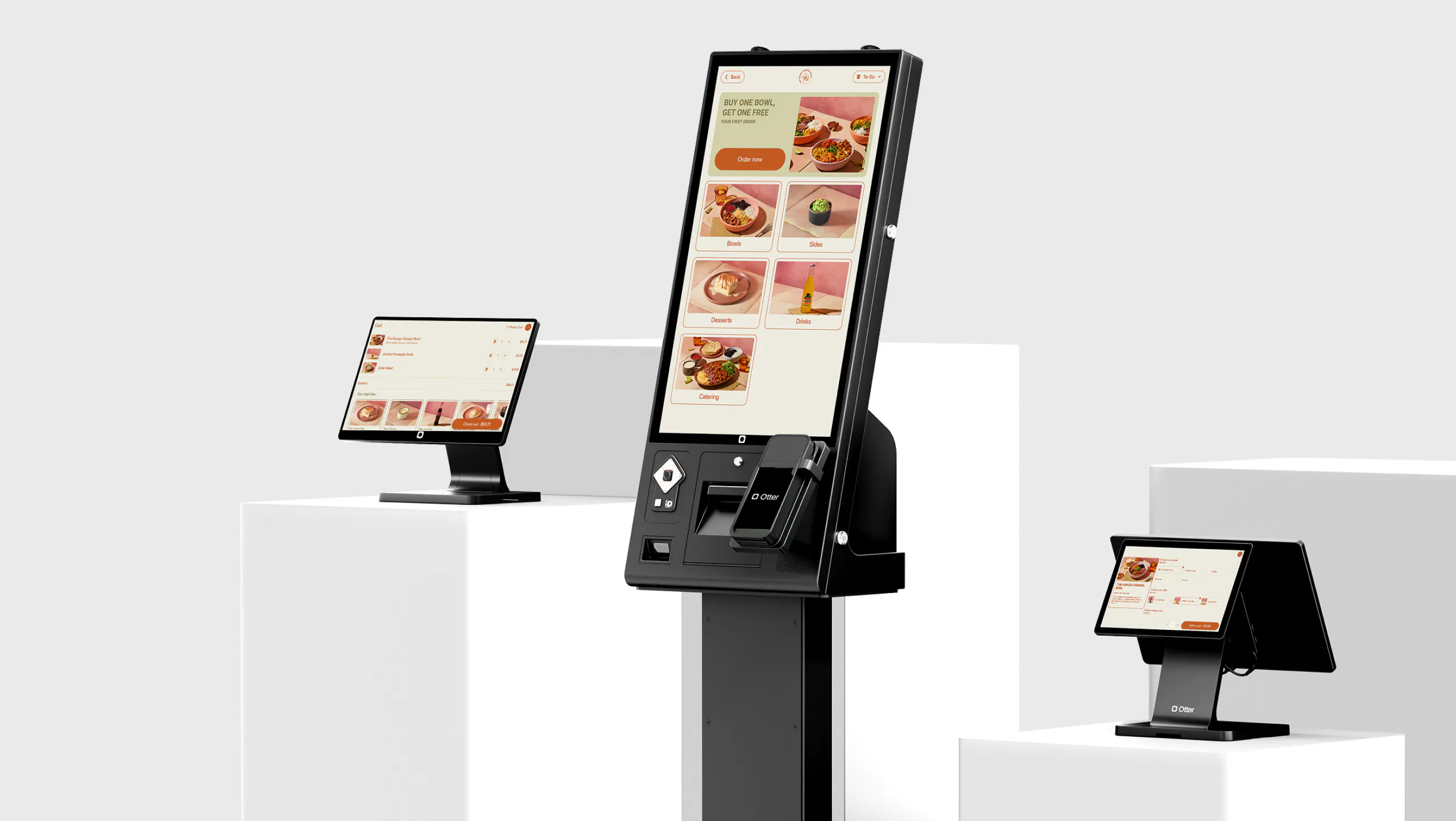
Otter hardware fits a busy floor. It comes as a 15-inch countertop unit or a 27-inch standing model, both Android-based, ADA-compliant, and both available to buy or lease.
The pricing is straightforward. Hardware starts at $1,500 for the Mini or $3,000 for the standing unit, with software at $99 per month, and onboarding runs seven days or less.
Otter Kiosk answers the checklist you just built for the top restaurant kiosks for order management, point for point.
Frequently Asked Questions
How do restaurant kiosks integrate with existing POS systems?
Restaurant kiosks connect to a POS through either a native integration or an API. Native integration is the stronger option, since it enables real-time menu sync, unified order reporting, and automatic price updates without a middleware layer. When you evaluate kiosk software, ask whether the POS connection is native or third-party. The answer shapes how fast menu changes go live and how reliably orders land in your reporting.
Can kiosks handle complex order modifications and routing?
Yes. A well-built ordering system captures modifiers, allergy notes, and special instructions the moment the guest places the order, then displays them in full on the kitchen display system. That removes the re-entry errors that drive order mistakes in manual workflows. Station-level routing sends each part of an order to the correct prep area on its own.
Are restaurant kiosks ADA-compliant?
Compliance depends on the build. ADA standards call for adjustable or accessibly positioned height, touch targets sized for limited dexterity, and audio support for guests with visual impairments. Compliance counts both legally and for serving every guest consistently. Not every kiosk meets the standard out of the box, so confirm ADA compliance directly with the vendor before you buy.
How long does implementation take?
A basic countertop kiosk usually takes one to two weeks for hardware setup, POS integration, and software configuration. Otter's onboarding runs seven days or less from order to go-live. Timelines stretch with multi-location rollouts, custom menu workflows, and deep loyalty integration, so ask your provider for a site-specific estimate before signing.
Can kiosks work offline?
Yes, as long as the kiosk software includes an offline mode. Without it, a dropped connection during peak hours takes the whole ordering system down, which is a serious risk for high-traffic restaurants. Offline mode keeps the kiosk taking orders and processing payments locally, then syncs to the POS and KDS once the connection returns. Confirm this feature before you purchase.
What is the typical ROI timeline?
Most operators reach positive ROI within 12 to 18 months, driven by three factors: labor reallocated from order-taking to production, higher average tickets from built-in upselling, and less waste from better order accuracy. High-traffic locations with steady peak demand tend to get there faster, and the upsell-driven lift in average order value is usually the largest single contributor.

Ready to see how a kiosk can transform your restaurant's order management?