Table of contents
- What a point of sale actually is in a restaurant
- How a restaurant POS handles a transaction, step by step
- The hardware that makes it work at the counter
- What the software does beyond taking payment
- Cloud-based vs. on-premises: what the choice costs you
- How your POS data connects to the books
- The POS you pick today determines what you know about your restaurant tomorrow
- FAQ
You are in the middle of a Saturday dinner rush. Orders are flying, the line is backed up, and suddenly the screen freezes. Your staff looks at you. Guests are waiting. Every second that system is down costs you real money. According to the National Restaurant Association, roughly 50% of all restaurant traffic moves through quick-service formats, which means a POS failure at peak volume is not a minor inconvenience. It is a revenue event.
A restaurant point of sale system handles every transaction from the moment a guest orders to the moment it shows up in your books. What follows is the full operational picture: how the order flows, what the hardware does, what the software tracks, and what that data means for your P&L.
Key Insights
- A restaurant POS is not a cash register. It is the data engine that turns every order, modifier, payment, and void into the numbers you run your business on.
- The transaction does not end at payment: shift close, daily reconciliation, and channel-level sales reporting are where a POS earns its keep long after the counter goes quiet.
- Cloud-based POS wins for independent restaurants on total cost of ownership, but only if it has a tested offline mode. Connectivity failure during a dinner rush is the number-one operator fear, and it is manageable if you ask the right question before you sign.
- When you can see ticket averages, channel revenue splits, and labor cost by shift, you make faster, better decisions than if you are waiting for your accountant to tell you what happened last month.
What a point of sale actually is in a restaurant
A restaurant point of sale system is the hub that records every order, processes every payment, routes tickets to the kitchen, and stores every sales transaction in one place. It does not just take payments, it generates the operational data your entire business runs on. It is not a cash register. Electronic cash registers were the next step up, but they still could not route a kitchen ticket, track a modifier, or tell you your ticket average by daypart. A cash register had a drawer, a paper receipt, and zero memory. It told you nothing about what sold, when, or why.
A retail POS comes closer, but it still misses the restaurant reality. Retail POS systems are designed for brick-and-mortar stores scanning barcodes and processing SKU-based returns. They do not handle modifiers ("no onions, extra sauce, add avocado"), split checks, kitchen routing, void logging, or shift reconciliation. A restaurant point of sale system has to do all of that, every shift, without slowing the line.
Three types of operations will get the most out of what follows:
- QSR and fast-casual counter operations where speed and order accuracy are the margin
- Independent single-location restaurants where you are often the manager, the bookkeeper, and the closer
- Ghost kitchen and virtual brand operators running multiple menus from one kitchen, where multi-channel order management is the daily challenge
For all three, the POS is not a purchase you make once and forget. It is the operational system your entire business runs on. Otter is built specifically for these restaurant contexts. Not a retail system adapted to food service, but a restaurant POS designed from the start for counter operations, fast-casual, and multi-channel kitchens.
How a restaurant POS handles a transaction, step by step
This is the full arc, exactly as it happens on your floor.
The order sequence
- Guest orders at the counter, kiosk, or online
Tip: Self-order kiosks and online channels feed into the same ticket queue as your counter. Your kitchen should see one unified stream, not separate order sources landing in three different places at once.
- Staff enters the order on the terminal, including all modifiers
Tip: Speed here is the variable that moves the line. A terminal that takes three taps to enter a modifier slows every order, and that compounds across a full dinner rush.
- POS routes the ticket to the kitchen display system or kitchen printer
Tip: Routing rules (which items go to which station) are set in your POS configuration. If they are wrong, the kitchen receives incomplete tickets and remakes eat into your margin.
- Kitchen preps and confirms. On a KDS, the ticket is bumped when the order is ready
Tip: A kitchen display system tracks how long each ticket has been open, so your kitchen manager can see which orders are running long before they become a guest complaint.
- Guest pays by card, mobile, cash, or a split between multiple methods
Tip: How fast your card reader processes a tap-to-pay or chip authorization directly affects how many guests you can move through in a rush. Authorization lag at the terminal is a throughput problem.
- Receipt prints or is texted, or both
Tip: Text receipts reduce paper costs and give you a touchpoint on the guest's phone, which is useful if your loyalty program ties to phone number lookup or email capture.
- Ticket closes and the transaction record is written to the system
Tip: This record is what your shift close, daily reconciliation, and P&L all depend on. Every modifier, payment method, and timestamp is stored here, permanently.
Every step creates a data record. That is the point.
The modifier problem
"No onions, extra sauce" sounds simple. At volume, it is where errors happen. The POS carries that instruction from the guest to the kitchen without a handwritten note or a shouted correction across the line. If the modifier does not reach the kitchen exactly as entered, you remake the dish, you slow the line, and the guest remembers it.
Payment types a modern POS must handle
- EMV chip cards: the standard for in-person card-present transactions
- Contactless payments and digital wallets: Apple Pay, Google Pay, tap-to-pay cards, and stored-value apps
- Cash: still relevant, especially for QSR and fast-casual formats
- Split payments: two cards, card and cash, or multiple guests splitting one check
- Gift cards: physical and digital; sold and redeemed through the POS without a separate system
Smooth payment processing across all of these methods is non-negotiable. Modern payment terminals must process transactions quickly across every method — if your terminal fumbles a tap-to-pay or takes ten seconds to authorize a chip card, you lose time on every order.
Voids and comps
When you void a ticket or comp a meal, that action must be logged, not deleted. Unexplained voids are where revenue leaks and accountability breaks down. A good POS requires a reason code and a manager override, and it keeps the record permanently. That data matters when you are reconciling at shift close.
Offline mode
This is the number-one fear in every operator community: the system goes down mid-rush. Modern cloud-based POS systems address this with local caching. The terminal continues processing orders and payments offline and syncs automatically when connectivity is restored. Before you sign with any vendor, ask them to demonstrate offline mode with your actual menu. Do not take their word for it.
The hardware that makes it work at the counter
Core components
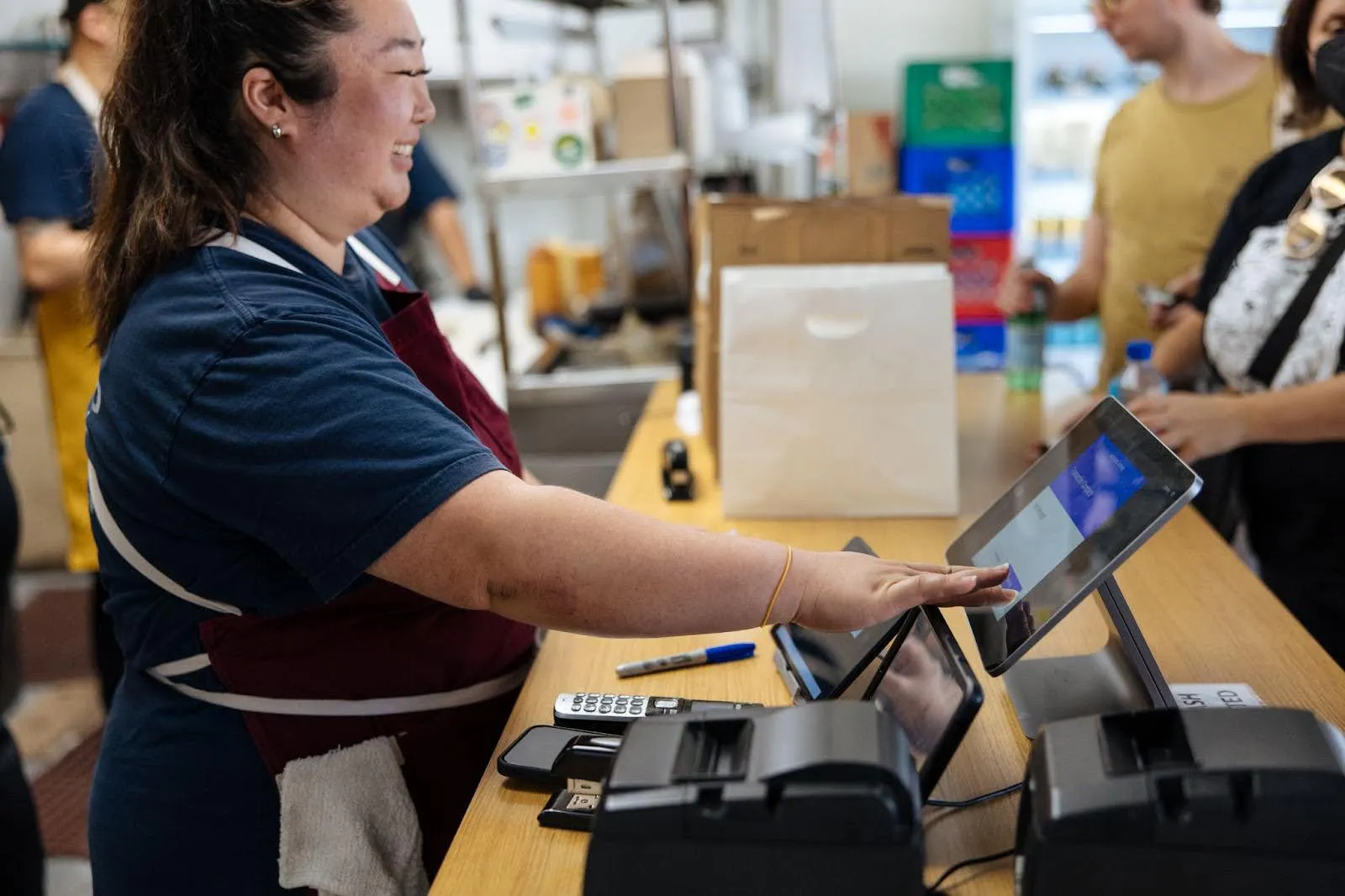
- Point of sale terminal: the primary input point for staff; user experience at the terminal directly affects speed of service, so it should be fast, responsive, and positioned where staff can reach it without blocking guest flow
- Card reader: must support EMV chip and contactless payment; tap-to-pay is no longer optional
- Receipt printer: thermal printers are standard; some operations are moving to text-only receipts to cut paper cost
- Kitchen display system (KDS) or kitchen printer: routes tickets from the POS to the kitchen
- Customer-facing display: shows the guest their order as it is entered, reducing errors before the ticket is ever sent
- Cash drawers: lock automatically at shift close and integrate directly with the POS for accurate cash reconciliation
- Barcode scanners: common in retail POS systems for SKU-based inventory; less common in restaurants, where menu-driven ordering replaces barcode lookup
Kitchen printer vs. KDS
A kitchen printer produces a physical ticket. It can get buried, torn, or ignored. A KDS shows live order status, tracks how long each ticket has been open, and flags orders that are running long. For QSR and fast-casual operations where throughput is the metric, a KDS is worth the investment.
Tablet and mobile POS (mPOS)
Tablet-based and mobile POS setups work well for fast-casual counters with limited space, or for kiosk configurations where guests self-order through a self-checkout POS. Less hardware footprint, same data. Self-order kiosks also reduce counter labor during peak hours and move the line faster. That is a real operational lever for fast-casual operators.
Hardware placement and network setup
Where you put the hardware matters as much as which hardware you buy. Terminals should be reachable without blocking guest flow. The KDS should be visible from every prep station. High-volume counters need multiple terminals to prevent bottlenecks.
On the network side: use a dedicated router for your POS, separate from your guest Wi-Fi. Confirm offline mode functionality before you sign.
Factor hardware into total cost
The monthly POS software fee is not the full cost. POS hardware — the point of sale terminal, card reader, receipt printers, KDS, cash drawers, and mounting — adds up separately, and installation costs vary by vendor. New to the category? Start with our primer on what a restaurant POS system is before comparing prices.
For a full breakdown of what to expect, see how much a restaurant POS system costs.
What the software does beyond taking payment
Order management
The software queues and prioritizes orders from every channel — counter, online ordering, kiosk, and ecommerce platforms — so the kitchen sees one unified ticket stream. When orders from delivery platforms, your own online store, and the front counter land in separate places, tickets get missed and guests get refunds. Multi-channel consolidation is not a nice-to-have for fast-casual and ghost kitchen operators. It is the difference between a smooth service and a chaotic one.
Menu management
Update a price, 86 an item, or add a limited-time offer from one dashboard. Changes push simultaneously to all channels, so the menu a guest sees on their phone matches what is actually available in your kitchen. When those two things are out of sync, you get orders you cannot fulfill and guests who do not come back.
Employee management and shift reporting
Employee management through the POS covers clock-in and clock-out, role-based permissions, tip pooling, and shift-level sales summaries so you can close a shift accurately without reconciling a paper log by hand. That data feeds directly into your labor cost analysis.
Loyalty programs
Otter's POS supports in-store loyalty enrollment directly at the terminal or via QR code. Staff can sign guests up at the counter, and every in-store purchase earns rewards automatically. No separate app, no third-party tool required. For independent operators, that means a real loyalty program running through the same system you already use to take orders.
Customer data and management
Every sales transaction builds a customer data record: order history, visit frequency, payment preferences, and customer behavior patterns across dayparts. That data is what a CRM uses to segment guests and run targeted promotions. Even without a full CRM integration, the customer management foundation lives in your POS from day one.
Otter's restaurant POS consolidates counter orders, online ordering, and a KDS into one platform. Built for restaurant operations from the start, not assembled from separate tools.
Cloud-based vs. on-premises: what the choice costs you
On-premises POS
Data lives on a local server inside your restaurant. It works without internet. The tradeoff: higher upfront hardware cost, and you own the IT burden. Software updates, backups, server maintenance, and repairs. When something breaks, you are calling a technician, not a support line.
Cloud-based POS
Cloud-based point of sale software stores data remotely. Lower upfront cost on a subscription model. Software updates automatically. You can access your dashboard from any device, anywhere. APIs allow cloud-based POS systems to connect with accounting software, loyalty platforms, and third-party delivery integrations without manual data entry. The dependency is internet connectivity, which is manageable with a reliable router and a tested offline mode.
Hardware is the other half — our guide on how to use a kiosk machine covers the day-to-day workflow.
The honest assessment for an independent operator
If you do not have an IT staff member, cloud-based almost always wins on total cost of ownership. The hidden costs of on-premises (technician visit fees, paid support packages, per-update charges, hardware refresh cycles) show up in the fine print. The advertised price and the real cost of ownership are two different numbers.
Questions to ask before signing
- Does the cloud POS have a functional offline mode, and can you test it before you commit?
- What does support cost when something breaks on a Saturday night?
- What is included in the base subscription vs. billed separately?
- What is the contract length, and what are the exit terms?
Multi-location operators
Cloud-based wins outright. One dashboard, consistent menu control, and consolidated reporting across all locations, with no on-site server at each one to manage.
How your POS data connects to the books
This is the half of the "counter to books" equation most operators ignore when shopping for a POS. It is also the half that pays back the most.
Daily sales reconciliation
At shift close, your POS produces a sales report covering all sales transactions for that period. That report should match your payment processor deposit exactly. When it does, you have clean books. When it does not, you have a discrepancy to find before your accountant does. Sales tax is calculated and tracked per transaction, so your daily reconciliation also produces the figures your accounting software needs. Daily sales reconciliation is an operations task, and it starts with the data your POS generates at shift close.
Ticket averages and menu pricing
Your ticket average exposes menu pricing problems before your monthly P&L does. If your average ticket is consistently below target, the POS data shows you which items are discounted most often, which modifiers drive add-on revenue, and which dayparts are underperforming. Otter's analytics dashboard surfaces ticket averages and channel revenue splits at the shift level, so you can act on that data the same week, not the same quarter.
Channel-level sales breakdowns
Knowing what percentage of revenue comes from the counter vs. online ordering vs. delivery platforms tells you where to invest: in staffing, in marketing, in menu development. Channel-level sales data replaces instinct with evidence.
Labor cost visibility
When the POS tracks shift hours, you can compare labor cost as a percentage of sales by shift and by day of week. Expensive slow periods show up in the data before they quietly erode your margin.
Food cost connection
A POS does not replace a dedicated inventory management system. But the sales data it generates (units sold by item, time of day, and channel) is the input that food cost calculations and inventory management tools depend on. Otter's sourcing and distributor discount program works alongside that sales data to reduce food costs over time, though those savings typically take around 90 days to materialize.
The practical outcome
With accurate sales, labor, and channel data flowing out of the POS, you get the business insights you need to build a real P&L, handle invoicing with your suppliers with confidence, and have a real conversation with your bookkeeper, without guessing at the numbers.
The POS you pick today determines what you know about your restaurant tomorrow
A restaurant POS is not a purchase you make to take payments. It is the system that generates every data point you will use to manage your operation, from the first order of the morning to the last line on your P&L.
The decision criteria that actually matter:
- Reliability: documented uptime, a tested offline mode, and a clear answer on what happens when connectivity drops mid-service
- Support quality: response time on a Saturday night, first-call resolution, and what that support actually costs
- Total cost of ownership: monthly fee plus support, hardware, update costs, and contract exit terms
- Fit for your service model: a QSR counter, a fast-casual line, and a ghost kitchen have different needs; the POS should match yours
A system your team can learn in one shift is worth more than a feature-rich platform that causes errors under pressure. Every order that runs through the POS (every modifier, every payment method, every voided ticket, every shift close) becomes a data record. If you can read those records, you know your numbers. If you cannot, you are guessing.
Ready to see what your numbers actually look like? Get a demo from Otter and see it for yourself.
FAQ
What is a point of sale system for a restaurant?
A restaurant point of sale system is the operational hub that records every order, processes every payment, routes tickets to the kitchen, and stores all transaction data in one place. It is not a cash register replacement. It is the system your entire operation runs on, from the first order of the day to shift close reconciliation.
What hardware does a restaurant POS system require?
The essentials are a touchscreen terminal, an EMV and contactless card reader, a receipt printer, a kitchen display system or kitchen printer, and a customer-facing display. In fast-casual and counter-service formats where space is limited, tablet and mobile POS setups are common and carry the same data capabilities as full terminal configurations. See Otter's restaurant POS system for how those pieces fit together.
What is the difference between cloud-based and on-premises restaurant POS software?
Cloud-based point of sale software stores data remotely, has lower upfront costs, updates automatically, and is accessible from any device, but requires internet connectivity, which a tested offline mode addresses. On-premises POS stores data locally, has higher upfront hardware costs, and puts the IT maintenance burden on you. These are just two of the main types of POS systems for restaurants. For most independent restaurants without dedicated IT staff, cloud-based is lower total cost of ownership.
How does a POS system help with restaurant bookkeeping?
The POS generates daily sales totals that should match your payment processor deposit exactly. That match is the foundation of clean reconciliation. Shift-level data on ticket averages, channel revenue splits, and labor hours also feeds directly into food cost tracking and P&L construction, giving you the numbers your bookkeeper needs without manual reconstruction.
What questions should I ask before choosing a restaurant POS?
Ask about uptime and how outages are handled, what support costs outside of business hours, whether the base subscription includes updates and help or bills them separately, the contract length, and the exit terms. Test the system with your actual menu before committing. Not a demo menu, yours.
Can a restaurant POS system handle online orders and delivery platforms?
If delivery is a big share of your sales, the best POS system for delivery restaurants consolidates orders from all channels (counter, online ordering, and third-party delivery) into one unified ticket queue so your kitchen is not managing three separate order sources at once. When channels are disconnected, tickets get missed, errors increase, and guests ask for refunds.

See how Otter brings counter orders, online ordering, and your KDS together in one restaurant POS