Table of contents
- What a restaurant POS system actually is
- How a restaurant POS works: from order to kitchen to payment
- Restaurant POS system components: what you actually need
- Restaurant POS software: the features that run your shift
- Cloud-based vs. legacy POS: what the difference means for your restaurant
- Why a retail POS won't cut it in your restaurant
- What does a restaurant POS system cost?
- Five questions to ask every POS vendor before you sign
- The POS you pick will either support your kitchen or fight it every shift
- Frequently Asked Questions about POS Systems
You searched "POS system" and got a wall of retail-focused answers about barcode scanners and SKU counts. None of it maps to a kitchen. More than 3 in 4 restaurant operators say technology gives them a competitive edge, according to the National Restaurant Association's Technology Landscape Report, yet the buying process still leaves most independent owners confused about what they actually need.
This primer cuts through that. By the end, you'll know exactly what a restaurant POS system is, how it works from order to payment, what it costs in real numbers, and the five questions you must ask before you sign anything.
Key insights
- A restaurant POS is not a retail POS with a menu loaded in. It needs modifier logic, kitchen station routing, and order-mode switching that generic business systems fundamentally lack
- Processing fees are where most of a POS system's real cost lives: at $40K/month in card volume, a 0.3% rate difference equals $1,440 a year. Compare total cost, not monthly software fees
- Offline mode is a baseline requirement, not a premium feature: your terminal, KDS, and printer should all keep functioning independently if your internet drops during a dinner rush
- The most important POS question isn't about features. Ask yourself: what happens when something breaks at 7 p.m. on a Saturday and the line is out the door? Support availability is the deciding factor most owners only discover after signing
What a restaurant POS system actually is
POS stands for point of sale: the moment a transaction is completed and the system that makes it happen. Money changes hands, an order is recorded, and a ticket fires to the kitchen.
A cash register does one of those three things. A POS system, including mobile POS systems on a tablet, does all of them and more. It accepts every payment type (cards, Apple Pay, contactless payments), routes kitchen tickets to the right station, and produces a full sales report at the end of every shift. Automatically, without anyone manually tallying anything.
It's also worth being clear on what a POS system actually is: software and hardware working together. The screen or tablet is not the POS. The card reader alone is not the POS. The POS is the combination of both, plus the software logic running underneath that ties your menu, your kitchen, your payments, and your reporting into one connected system.
For an independent, QSR, or fast-casual owner, this is the single most consequential operational technology decision you will make. Everything flows through it: speed of service, kitchen accuracy, payment reliability, and the data you use to run your business.
How a restaurant POS works: from order to kitchen to payment
Here's the end-to-end flow in plain language:
- A staff member enters an order at the terminal, or a guest orders at a kiosk or online
- The POS routes the ticket to the correct kitchen station or kitchen display system (KDS): grill, fry, bar, prep
- The kitchen prepares the order
- Staff closes the check
- Payment processing happens in seconds: card, cash, or mobile POS reader
- A receipt is issued and the transaction is recorded automatically
The step that separates a restaurant POS from a retail terminal is order routing. The right items go to the right station with no manual handoff. A grill item prints at the grill. A drink fires to the bar. That's not a feature. It's the baseline for running a kitchen without chaos.
A modern restaurant POS also handles every order mode (counter service, takeout, and delivery) with different ticket formats and flows, all from the same system. No re-entering orders. No switching screens.
Multi-channel orders are where this gets especially important if you're running delivery today. Third-party orders from DoorDash or Uber Eats should flow into the same kitchen queue as your in-store orders. Otter's POS is built exactly for this: it consolidates in-store, online, and third-party orders into one unified queue so your kitchen sees one stream, regardless of where the order originated. No extra tablet. No manual re-entry. No missed tickets.
At a busy fast-casual doing hundreds of transactions per shift, manual entry doesn't scale. Every extra step is a potential error, and errors at volume cost you real money.
Restaurant POS system components: what you actually need
Must-have hardware:
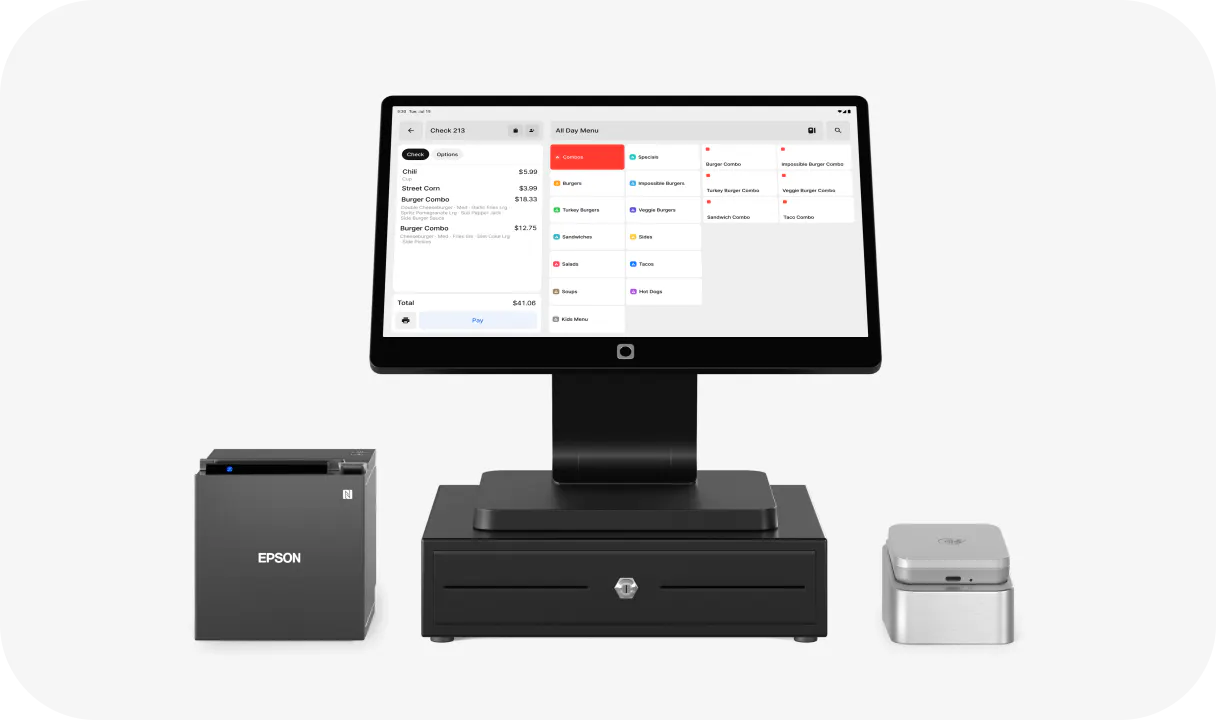
- POS terminal or tablet (primary order-entry screen)
- Card reader or credit card reader
- Kitchen receipt printer or KDS
- Guest receipt printer
Useful add-ons:
- Cash drawer (cash usage is declining, but still relevant for many QSR and fast-casual owners)
- Customer-facing display: shows the order and subtotal in real time, reduces disputes at the counter
- Self-service kiosk: frees counter staff during peak periods and can increase average ticket size
On printers: Bluetooth thermal printers offer placement flexibility in tight kitchens; wired printers offer more consistent reliability. Ask every vendor one question before you sign: are you locked into proprietary hardware? Some vendors require their own equipment. If you switch providers in 18 months, you may have to buy an entirely new hardware bundle. Get the answer in writing.
Otter's hardware bundle (terminal, Bluetooth printer, and card reader) is designed for quick self-installation and comes with free personalized onboarding. That's not standard across the market: per Otter's published comparison, Clover, Square, Toast, and Revel don't offer free personalized onboarding.
Restaurant POS software: the features that run your shift
Menu management. Build items, set prices, add photos, organize categories. Changes sync instantly across all screens, including online ordering and kiosk, with no updating four places separately.
Menu modifiers and build-your-own logic. "No onions, extra sauce, sub gluten-free bun" needs to print as a clear kitchen instruction on a single ticket. This is non-negotiable for any real restaurant menu. If your POS software can't handle a modifier tree cleanly, your kitchen will be guessing on every custom order.
Order modes. The same software should handle counter service, takeout, and delivery with the correct receipt format and tax logic for each. These are not the same ticket.
Voids and comps. You should be able to remove an item or apply a discount mid-ticket without voiding the whole order. This has to be fast during service, not a three-step workaround.
Split checks. Two cards on one ticket, or a party splitting four ways. It should take seconds.
Real-time reporting. Net sales, payment type breakdown, top items, and average ticket. POS reports and sales reporting are accessible from your phone, not just the terminal at the restaurant. On a cloud-based system, you can check last night's numbers before you even leave the house.
Food cost tracking. Your POS sales data (units sold by item, time of day, and channel) is the foundation for food cost calculations and inventory tracking. If you're looking for a dedicated solution, see food inventory software options matched to your kitchen type
Loyalty. Otter's POS supports card-linked loyalty programs so guests earn loyalty points and redeem at the counter without a separate app. Staff can enroll new members directly on the POS or via QR code.
Multi-location management. If you run two or more locations, you should be able to manage menus and pull reports across all of them from a single login.
Cloud-based vs. legacy POS: what the difference means for your restaurant
Legacy on-premises POS stores data on a local server at your restaurant. Updates require IT support. If the server fails mid-service, you may lose access to everything. Upfront hardware costs are higher, and ongoing maintenance is your problem. To see the full picture from counter to books, it helps to understand how a point of sale works end to end.
Cloud-based POS stores data on remote servers offsite, updates automatically, and is accessible from any device — just one of several types of POS systems on the market. . It typically runs on a monthly subscription with a lower upfront cost and a predictable recurring fee. According to Grand View Research, cloud deployments now account for the largest share of restaurant management software, and that shift is accelerating.
The critical caveat: offline mode. Cloud-based does not mean useless without internet. A quality cloud POS should keep accepting orders and processing card payments when your connection drops. Ask vendors about this specifically, and ask about each hardware component separately. Otter's restaurant POS system supports offline mode on both the terminal and printer.
For independent and growing multi-location owners, cloud is almost always the right call: lower IT burden, remote access to real-time reporting, faster support resolution.
Why a retail POS won't cut it in your restaurant
This is the most important section if a sales rep has ever quoted you a "business POS" or "multi-industry solution."
Retail POS hardware and software are built around SKUs: scan a barcode, record a sale. A restaurant POS is built around modifiers, routing logic, and kitchen communication. These are not the same architecture.
Here's what breaks when you put a retail POS in a kitchen:
- No modifier logic: a retail system can ring up "burger." It cannot handle "burger, no bun, extra pickles, add avocado" as a single clear ticket for the cook
- No kitchen routing: retail POS has no concept of sending items to specific stations, so everything prints together and creates confusion
- No order-mode switching: a retail system doesn't understand the difference between takeout and delivery; ticket format, sales tax treatment, and receipt logic all differ between modes
- No mid-ticket comp workflow: retail comps are usually post-transaction refunds, not mid-ticket adjustments built for the pace of service
The complaint you'll hear from owners who've tried it: "the software feels built for retail, not the pace and complexity of a restaurant." That's not a minor inconvenience. Using a retail POS in a restaurant shows up in kitchen errors, slower service, and staff frustration on every shift.
What does a restaurant POS system cost?
Three buckets. Understand all three before you compare vendors.
- Hardware. A starter bundle (terminal, card reader, receipt printer) typically runs $300–$800+ upfront. Proprietary hardware from some vendors pushes this higher and creates lock-in risk.
- Software subscription. Monthly fees range from $0 (basic tiers) to $100–$300/month for full-featured restaurant POS software. Multi-location pricing is usually billed per location.
- Processing fees. Typically 2.5%–3%+ per card transaction. This is where the real volume cost lives. At $40K/month in card sales, a 0.3% rate difference equals $120/month or $1,440/year. Compare this number across vendors, not just the software subscription.
Hidden fees to ask about before signing:
- PCI compliance fees
- Chargeback fees
- Add-on module fees (loyalty, gift cards, online ordering, kiosk)
- Early termination fees
Get all of this in writing. Otter offers free personalized onboarding, so factor setup and training costs into your total comparison, since most competitors charge for this or don't offer it at all. Always compare total cost over 12–24 months. At volume, the monthly software fee is often the smallest line item.
Five questions to ask every POS vendor before you sign
- What happens when the internet goes down? Ask specifically about offline mode for the terminal, KDS, and printer as separate items. Vendors often cover one but not all three.
- Are you locked into proprietary hardware? If you switch providers in 18 months, can you keep your equipment? What are the exit fees?
- What are the actual processing fees, and can I use my own processor? Some vendors bundle processing and make it non-negotiable. Know which you're buying before you sign.
- Does the system handle multi-channel orders natively? Can online and third-party delivery orders flow into the same kitchen queue as in-store orders? Or will you need another tablet on your counter? Ask for a live demo of this flow.
- What does support look like at 7 p.m. on a Saturday? Verify 24/7 availability and whether you reach a real person or a ticket queue. This is the moment every owner cares about most, and usually only discovers after signing.
Ask for a reference from a restaurant with a similar concept and volume. Not a hand-picked case study from the vendor's website.
Otter offers 24/7 support, offline mode across terminal, KDS, and printer, menu modifier management, real-time reporting, and free onboarding, all verifiable from Otter's published comparison data.
The POS you pick will either support your kitchen or fight it every shift
A restaurant POS is not a commodity decision. It is the operational backbone of every order, payment, and report you will ever run.
The non-negotiables: restaurant-specific menu modifiers, kitchen station routing, reliable offline mode across all hardware, transparent total-cost pricing, and real human support when service is live.
The wrong POS creates friction at the counter, confusion in the kitchen, and blind spots in your reporting. All of that costs you money and staff morale. Not just when something breaks, but every single day.
With the right questions and a clear-eyed cost comparison, picking a POS that runs with you through service is entirely within reach.
Otter POS for restaurants
The all-in-one platform that enhances operations across your entire business. Consolidate orders, increase sales, and make your days easier.
Frequently Asked Questions about POS Systems
What does POS stand for in a restaurant?
POS stands for "point of sale": the system and the moment where a transaction is completed. In a restaurant, that means taking an order, routing it to the kitchen, and processing payment through one connected system.
What is the difference between a POS system and a cash register?
A cash register records cash transactions. A POS system accepts cards and mobile pay, routes kitchen tickets, tracks sales in real time, and generates end-of-day reports automatically, with export options for accounting software integrations.
What hardware does a restaurant POS system include?
The core hardware is a terminal or tablet for order entry, a card reader, and either a kitchen receipt printer or a KDS. A cash drawer and customer-facing display are common add-ons. Exact bundles vary by vendor and restaurant type.
Do I need internet to run my restaurant POS?
Cloud-based POS systems need internet to sync data, but they should have an offline mode that keeps the terminal, KDS, and printer running if your connection drops. Ask vendors about offline capability for each hardware component separately — including any self-checkout POS kiosks. The answers often differ.
How much does a restaurant POS system cost per month?
Costs break into three buckets: hardware ($300–$800+ upfront for a basic bundle), software ($0–$300/month depending on features and tier), and processing fees (typically 2.5%–3%+ per card transaction). Processing fees are where the real volume cost lives. Always compare total 12-month restaurant POS system costs, not just the software subscription.
Can a POS system handle online and delivery orders?
The best restaurant POS systems pull multi-channel orders (online and third-party delivery) into the same kitchen queue as in-store orders. Systems that don't do this natively force you to manage multiple tablets and manually re-enter orders, which creates errors and slows service.
What is the difference between a cloud-based and a legacy POS?
Legacy POS stores data on a local server at your location: high upfront cost, manual updates, IT dependency. Cloud-based POS stores data offsite, updates automatically, and gives you real-time reporting from any device. The key question for any cloud system — whether a terminal or a restaurant kiosk system — is whether it has a reliable offline mode when your internet goes down.
Can I use a retail POS system in a restaurant?
You can, but it will break your workflow quickly. Retail POS has no menu modifier logic, no kitchen station routing, and no order-mode switching between takeout and delivery, a gap that payment terminals alone cannot fix. For any restaurant with a real kitchen and a customizable menu, a retail POS is the wrong tool for the job.

Want to see how a restaurant-built POS handles in-store, online, and delivery orders in one queue?