
Table of contents
- Why most food waste logs get abandoned after two weeks
- What goes in a food waste log: the five fields that actually matter
- Pre-consumer vs. post-consumer waste: logging at the right moment
- Paper or digital? How to choose based on your kitchen
- Who owns the log: assigning shift accountability without adding headcount
- The 10-minute weekly waste review that drives real purchasing decisions
- Waste data only moves the needle when it changes what you order next
You've tried the log before. Someone printed a sheet template, taped it to the prep station, and the kitchen filled it out for three or four days. Then service got busy, the opener changed, and the clipboard disappeared under a stack of delivery receipts. Sound familiar?
You're not alone, and it's not a motivation problem. ReFED's most recent Food Waste by Sector: Foodservice fact sheet estimates the U.S. foodservice sector generated 12.5 million tons of surplus food in 2024, worth roughly $157 billion, about 14% of foodservice sales. Yet most operators have no consistent system for tracking where their share of that waste actually originates. The log fails because it was designed for a health inspection, not a real shift.
This is about fixing that. Not with a better template. With a habit system that fits inside the workflow you already have, and one that actually protects profitability in a restaurant business running on thin margins.
Key insights
- Most food waste logs fail because no one owns them by name per shift, not because the template is wrong. Assign a specific role and the log outlives the first two weeks
- Five fields are all you need: item, quantity, reason for waste, cost, and date and time. Every field you add beyond that is a compliance tax that drives inconsistent logging during service
- Pre-consumer waste, spoilage and over-prep, almost always costs more than post-consumer waste and is more directly fixable. Start logging there before worrying about plate returns
- Waste data only lowers your food cost when it changes your next purchase order. A log without a weekly decision review is a diary; a log with a decision framework is a cost-control tool for real cost savings
Why most food waste logs get abandoned after two weeks
Three failure modes kill almost every restaurant waste log, and none of them are about staff attitude.
1. No named owner per shift. When "everyone" is responsible for logging, no one is. The clipboard sits there. Someone fills it in when they remember. The data is patchy by Wednesday and empty by Friday. Shift accountability is the single biggest predictor of whether a log survives past week two.
2. Too many fields to fill during service. A log with eight columns was designed by someone who has never prepped a hundred covers. During a rush, your prep lead is not stopping to write a paragraph. If one row takes more than 30 seconds, the row gets skipped.
3. No visible feedback loop. Staff log waste and nothing changes. No one mentions it. No adjustment gets made. After a week or two, logging feels pointless, because, functionally, it is.
The fix is not a new form. It's treating the log as an operational system: one named person per shift, five fields maximum, and a weekly review that produces at least one visible decision that helps reduce food waste where it actually costs you money.
What goes in a food waste log: the five fields that actually matter
Keep it tight. These five fields give you everything you need to act on waste data.
- Date and time: which day, and roughly when, the waste occurred
- Item name: specific enough to be useful ("chicken thighs," not "protein")
- Quantity: weight in pounds or a unit count, depending on how you order
- Reason for waste: from a pre-set pick-list only (more on this below)
- Estimated cost: quantity x unit cost
That last field is non-negotiable. Logging "some chicken" tells you nothing. Logging 2 lbs at $4.80/lb tells you $9.60 walked into the trash. Cost converts waste from a vague feeling into a number you can act on.
The reason pick-list matters more than you think. Free-text reason fields produce entries like "went bad," "too much," and "nobody ordered it." You cannot aggregate those week over week. Use a short, fixed list instead:
- S: Spoilage
- O: Over-prep / overproduction
- E: Expired
- R: Returned / unsold
- X: Other (remakes, kitchen mistakes, and anything that doesn't fit the first four)
Print that code key at the top of every sheet. Staff circle a letter. They don't write a sentence.
Optional sixth field: For multi-location operations or larger kitchens, add a prep station or shift column. It lets you compare waste patterns across locations or time blocks without rebuilding the whole log.
Every field beyond five is a compliance tax. If staff skip one field, they tend to skip the whole row.

Pre-consumer vs. post-consumer waste: logging at the right moment
- Pre-consumer waste happens before food reaches the customer: trim from produce, proteins portioned but not used before close, over-prepped mise en place tossed at end of shift.
- Post-consumer waste, sometimes called plate waste, comes back from the customer: returned dishes, daily specials that don't sell, unsold prep at closeout.
- Pre-consumer waste almost always costs more and is more directly fixable. A kitchen discarding over-prepped proteins has a par level or forecasting problem, both of which you can adjust with tighter prep lists. Post-consumer waste is real, but it's a menu or recipe signal, not a prep signal. Waste that consistently traces back to over-ordering rather than prep or portion sizes is a sourcing signal instead, and belongs in your next purchasing conversation, not your prep meeting.
Log pre-consumer waste in real time, at the prep station or walk-in, the moment it happens. Memory degrades fast during service. If your prep lead waits until end of shift to recall what got tossed at 10 a.m., half of it won't make the log.
Log post-consumer waste separately. A tally mark system at dish return or a single row at closeout is sufficient. Keep it in its own section of the sheet so your weekly review doesn't mix the two data streams. If unsold prep or leftover food is still safe and within date at closeout, some operators route it to a local food bank instead of the trash, which won't move your waste-cost number but is worth building into your closing routine anyway.
Paper or digital? How to choose based on your kitchen
Paper is not automatically worse. For an owner-operated single location, a clipboard near the prep station that you review every night is faster to implement and more consistent than onboarding staff to a new app.
The real paper problem is aggregation. At week's end, someone has to tally entries manually. That step almost never happens. Paper logs produce entries but not insight.
Digital minimum viable setup: A shared Google Sheet functioning as your food waste tracking sheet on a tablet at the prep station, with dropdown validation on the reason column and an auto-summing cost column. No app purchase. Staff training: one five-minute demo.
When digital is worth the extra setup friction:
- You're not physically present for every shift
- You run more than one location
- You want waste data ready for a weekly review without doing math by hand
Honest trade-off summary:
- Paper: faster to start, harder to aggregate
- Digital: setup friction upfront, but data is review-ready at week's end
A free food waste log sheet template in Google Sheets, with dropdown reason codes and an auto-calculating cost column, is the practical middle ground for most independent operators.
Who owns the log: assigning shift accountability without adding headcount
The single biggest predictor of restaurant waste log stickiness is one named person per shift. Not "the kitchen." A specific role.
Recommended model:
- The prep lead logs waste during prep
- The closing manager does a final tally and signs off
Two checkpoints. Two people. No ambiguity about who dropped the ball if the log is empty.
Build logging into an existing task, not a new one. If your opening checklist or prep lists already include a walk-in temperature check, add a waste line to it. The habit piggybacks on existing muscle memory instead of competing for attention.
If your kitchen staff are skeptical, consider this: if one row takes 30 seconds and the reason is a letter they circle, consistent compliance is mostly a design problem, not a culture problem. A pre-set pick-list removes the thinking friction that makes staff skip rows during a rush.
For ghost kitchens and virtual brands running lean crews, you may be the sole logger. That's fine. Consistency beats complexity.
Avoid rotating ownership. In practice, "everyone is responsible" means no one is.

The 10-minute weekly waste review that drives real purchasing decisions
Without a weekly review, the log is a diary. It records what happened but changes nothing. The review is where waste tracking earns its keep and where food waste reduction actually starts to show up in your numbers.
What the 10-minute meeting covers:
- Total waste cost for the week vs. the prior week
- Top three wasted items by dollar value
- Reason category breakdown: is waste dominated by spoilage, over-prep, or returns?
Decision framework by waste reason:
- Spoilage: check storage temps and order frequency; consider smaller, more frequent deliveries instead of bulk over-ordering
- Over-prep / overproduction: compare against POS sales counts, recalibrate prep par levels, and check portion sizes
- Returns / unsold: flag for menu review
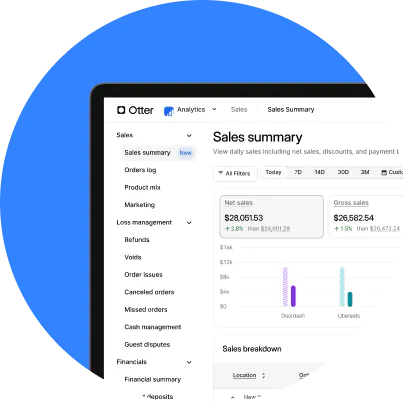
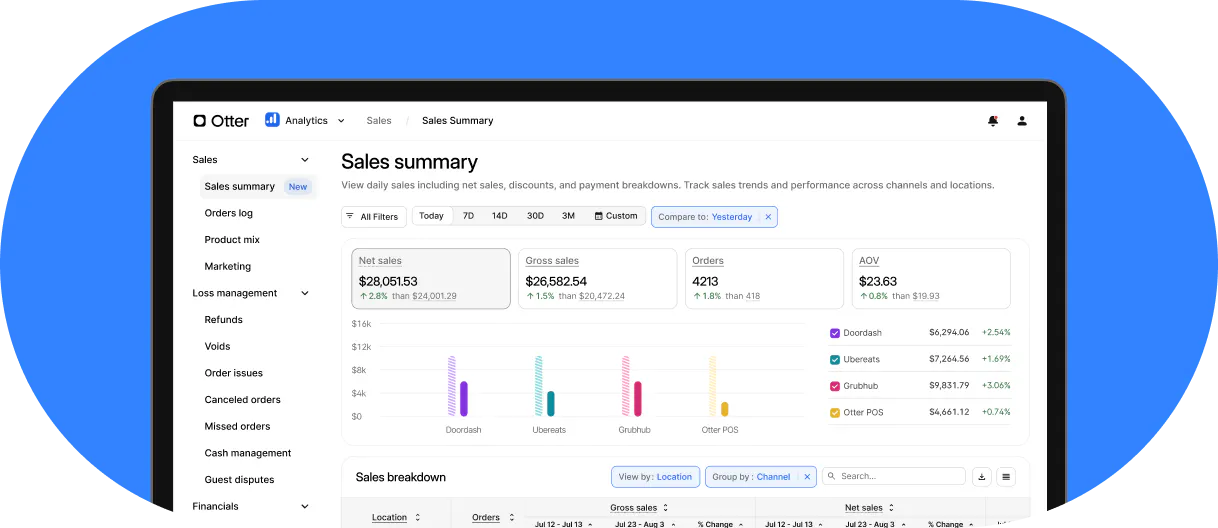
That second point is where your POS data and your waste log start working together. Otter's POS analytics surface item-level sales velocity by day and daypart. If a menu item keeps showing up on your waste log and shows slow movement in Otter's sales data, both signals are pointing at the same problem from two directions. That item is a candidate for a price adjustment, a portion resize, or a removal, before it keeps draining prep costs.
"I like your guys' reporting. Specifically the product mix report, it tells us what we've sold the most for the day, to the least. We got Otter back in May, and since then we've cut out three items that were really just costing us money to have on the menu. I feel that has been beneficial."
Nicoletta (Nicole) Kuti, co-owner of Telly's Charburgers, Santa Clarita, CA
Set a dollar threshold that automatically puts an item on the agenda. Any single item exceeding $50 in waste in one week gets discussed, for example. That keeps the review concrete instead of open-ended.
Keep the meeting to the manager and one prep lead. One change per week, maximum. Over-action kills the habit faster than under-action.
Waste data only moves the needle when it changes what you order next
A food waste log that never connects to a purchasing decision is just a record. The operators who actually achieve waste reduction use waste data as a sourcing signal: which items cost the most to waste, and can those items be sourced cheaper or ordered in smaller quantities?
The full decision chain:
- Waste log identifies top wasted items by cost
- Weekly review flags them for sourcing review
- You adjust order frequency or find a lower-cost equivalent
- Food cost percentage starts to shift
Be honest with yourself about timelines. Ordering adjustments take months, not days, to show up clearly in your food cost percentage, or in your COGS ratio if that's the metric your restaurant business tracks. That's normal. The log builds the case over time.
Good inventory management and waste management go hand in hand in food service, and joining a group purchasing arrangement is one of the more direct ways to turn that sourcing signal into cost savings; Otter's guide to restaurant supply chain management covers GPOs alongside supplier relationships and contingency planning in more depth. Once you know which ingredients to target, Otter's Inventory Savings connects your existing food distributors and surfaces sourcing recommendations for the same product quality at a lower price, plus cash back on qualifying orders. You connect your distributors, keep ordering as usual, and discounts unlock. The waste log tells you which ingredients to focus on; Otter's sourcing tool helps you pay less for the ones you keep buying. Savings typically accumulate over a roughly 90-day window after setup.
Ready to lower your food costs?
See what Otter can do for your restaurant.
The food waste log your kitchen actually keeps using is the simplest one that fits inside a real shift. Five fields, one named owner per shift, and a 10-minute weekly review beat any elaborate food waste tracking sheet or system that dies after two weeks, and they're what actually cut costs in a restaurant business that can't afford to guess.

Catch waste faster with Otter's analytics