
Table of contents
- What your restaurant website has to do (beyond looking good)
- DIY website builders: real costs and real limitations
- Hiring a restaurant website design company: what you're paying for
- Which option fits your type of operation
- Must-have features on any restaurant website (non-negotiable checklist)
- What to ask a web design company before you sign anything
- How your website connects to your kitchen (the part most agencies don't mention)
- Common restaurant website mistakes that cost you customers
- The right website pays for itself; the wrong one costs you
- Restaurant website design: frequently asked questions
Someone near your restaurant types "best tacos open now" into their phone. If your restaurant doesn't appear, you’ve lost the sale. Or maybe those who do reach your site bounce within seconds because they can't find your hours or read the menu on a small screen.
A widely cited MGH survey found that 77% of diners check a restaurant's website before dining in or ordering out, and nearly 70% said a bad one had talked them out of going. Even years later, the behavior it points to hasn't changed: your site is doing one of two things right now, bringing people in or sending them to a competitor.
A proper website must do three things: show up in local search, make your menu and hours obvious, and capture the order before the visitor leaves. Looks are secondary.
This guide covers when DIY works, when an agency earns its cost, what to pay, what to ask, and where your online orders actually go after someone taps "order now.
Key insights
- Hiring a restaurant web design agency does not automatically produce better results. The agency needs to understand restaurant operations, not just graphic design, or you will end up with a site that impresses nobody and converts no one.
- Before signing with any web design company, confirm in writing who holds domain ownership, who controls the hosting, and what CMS the site is built on. These three questions prevent the most common and most costly mistakes you can make.
- If you run a QSR or fast-casual operation, how the order flow reaches your kitchen matters more than how the homepage looks. A website with a disconnected ordering setup creates more operational problems than it solves.
- DIY website builders are a legitimate and often smart choice if you run a single-location independent, a food truck, or a ghost kitchen testing a new concept. They have improved significantly and should not be dismissed because an agency told you to.
What your restaurant website has to do (beyond looking good)
Every restaurant website has three functional jobs:
- Surface in local search: show up when someone nearby searches for what you serve.
- Communicate the offer clearly: menu display with prices, hours, and location all visible without hunting.
- Capture the order or reservation before the visitor leaves.
A phone-screen visitor decides in under 10 seconds whether to stay or bounce, so your site has to be mobile-friendly first. Design only matters insofar as it speeds up that decision. Your backstory can come later. Answer "what do you serve and where are you?" first.
Frame the DIY vs. agency choice as function-first, budget-second. The question is not "which option looks more professional?" It's "which option does the job my operation actually needs, at a cost my margins can support?"
DIY website builders: real costs and real limitations
What they cost
The main restaurant website builders (Wix, Squarespace, and GoDaddy) all include hosting in their annual plans:
- Wix: ~$192–$324/year
- Squarespace: ~$192–$432/year
- GoDaddy Website Builder: ~$120–$240/year
No surprise hosting bills. No developer on retainer. For a basic restaurant web presence, these are legitimate, user-friendly tools. General-purpose e-commerce builders like Shopify can technically host a menu, but they are built for retail carts, not restaurant ordering.
What DIY gets you
- Mobile-friendly, responsive design templates with restaurant website templates built for menus and hours.
- Basic local SEO settings (page titles, meta descriptions).
- Menu pages, contact info, social links.
- Increasingly capable online ordering add-ons.
Where DIY breaks down
- Limited control over technical SEO: schema markup, structured data, and meta architecture require workarounds.
- Online ordering add-ons that may not connect to your POS, leaving orders in an email inbox instead of your kitchen.
- Templates that look similar to every other local restaurant online, making differentiation harder.
When DIY is the right call
- Single-location cafe, bakery, food truck, or pizzeria with modest website-driven revenue.
- Ghost kitchen testing concept viability before committing to a bigger investment.
- Budget under $500/year.
When DIY is the wrong call
- You need orders flowing automatically into your kitchen system.
- You're running multiple locations with different hours and local menus.
- You want to outrank delivery apps in local search results.
One honest note: DIY builders have improved significantly. Don't dismiss them because an agency told you to.
Hiring a restaurant website design company: what you're paying for
Most agencies don't publish their rates. The real spend breaks down by tier.
Tier 1: template agency
- $1,500–$3,500 upfront + $100–$200/month ongoing.
You get a customized restaurant template with your branding, menu copy, and photos. Turnaround is typically 2–4 weeks. Good if you want a polished online presence without starting from scratch.
Tier 2: mid-market agency
- $3,500–$8,000 upfront + $150–$300/month ongoing.
Custom layout, photography direction, basic local SEO setup, and help with online ordering integration. Turnaround is 4–8 weeks. This is where most independents with real website-driven revenue should be looking.
Tier 3: custom build
- $8,000–$25,000+ upfront.
Fully bespoke custom website design and development, advanced local SEO, custom order flow, multi-location architecture. Turnaround is 8–16 weeks or more. Justified only when website-driven revenue is significant and your operation is complex.
What's typically NOT included unless you negotiate it in writing
- Menu copywriting.
- Monthly SEO maintenance after launch.
- Menu updates post-launch.
- Emergency fixes outside business hours.
The risk is valid: restaurant website design agencies that don't understand restaurant operations build sites that look great in a proposal and fall apart during a 7 p.m. rush. Ask for live restaurant site examples, not mock-ups, and test them on your phone before signing anything.
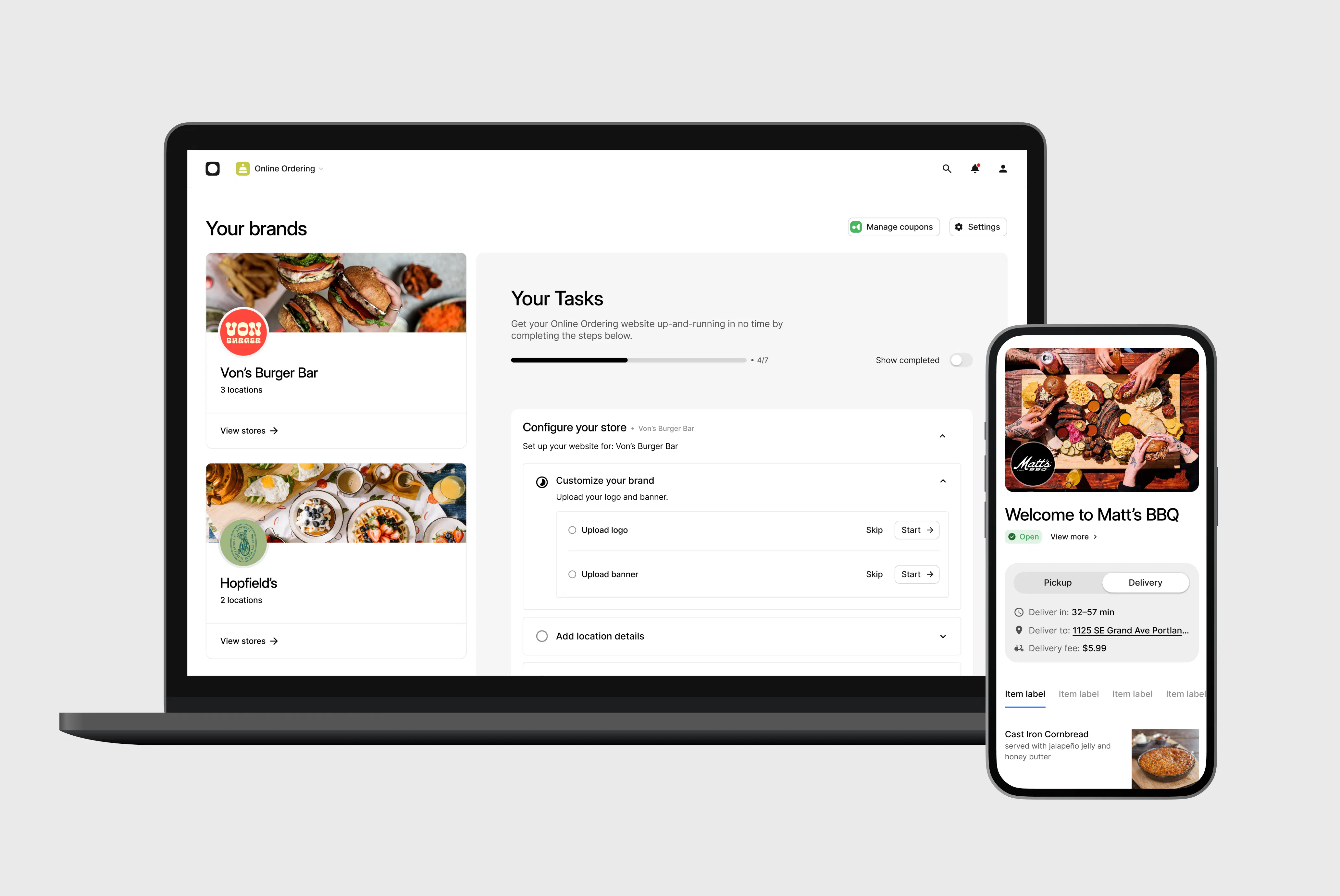
If you want your menu and direct ordering to live on your own domain without managing a third-party agency, Otter Online Ordering lets guests place individual, group, and catering orders directly through your site, with each order flowing straight to your POS and kitchen.
See how Otter Online Ordering connects your site to your kitchen.
Which option fits your type of operation
Ghost kitchen / virtual brand: Your website is the storefront. Local SEO and direct ordering matter far more than visual flair. A well-configured DIY builder or an SEO-focused mid-tier agency will outperform a flashy custom build that doesn’t rank. Digital marketing spend here is better directed at local search and online visibility than at design.
QSR and fast-casual: Order flow is everything. Orders need to land in your POS, not in an email inbox that someone manually re-enters during a rush. Let this requirement drive the platform decision, not the homepage design.
Multi-location independents: You need consistent brand identity with location-specific pages covering different hours, addresses, and local menus. This is where a mid-market agency or a purpose-built restaurant platform earns its cost. If reservations drive your business, budget for a reservation system such as OpenTable and confirm it integrates cleanly with your site.
Single-location independent cafe, bakery, or pizzeria: DIY is often sufficient if you maintain it. Consider putting the agency budget toward professional food photography instead. It returns value on every platform you use.
Food truck operators: A fast-loading, mobile-friendly site with your current location, menu, and social links is enough. Squarespace or Wix handles this well.
Where restaurant marketing budget goes next: once the site works, the highest-return channels are local SEO, email marketing, and a loyalty program that turns first-time orders into repeat visits. Paid channels like PPC and social media marketing can help, but only after the site itself converts.
The key decision variable: what share of your revenue do you expect to come through the website? Higher website-driven revenue means more justification for a proper agency or platform investment.
Must-have features on any restaurant website (non-negotiable checklist)
- Mobile-first, responsive design: most restaurant searches happen on a phone, so if your site doesn't work perfectly on a small screen, it isn't working.
- Menu display with prices as live HTML text: never a PDF. PDFs fail on mobile, don't load reliably on slower connections, and leave your personalized menu invisible to search engines.
- A clear call to action for online ordering or reservations above the fold: don't make customers scroll to figure out how to give you money.
- Accurate hours, address, and a tap-to-call phone number: make these impossible to miss on mobile.
- Google Business Profile NAP consistency: the name, address, and phone number on your website must match your Google Business Profile exactly. Any mismatch hurts your search engine optimization and local rankings.
- Fast load time under 3 seconds: oversized food photography is the single most common culprit. Compress every image before uploading.
- WCAG accessibility compliance: alt text on all images, sufficient color contrast, readable font sizes. WCAG accessibility standards protect you legally and help search engines understand your content.
- SSL certificate (https://): without it, browsers warn visitors your site is not secure, and it affects Google ranking.
- Social media integrations: links to Instagram and Facebook at minimum, so your online presence stays connected.
For a deeper look at the terms your menu pages should target, this guide to restaurant SEO keywords walks through how to surface on local search.
What to ask a web design company before you sign anything
Most operators skip this section. Most operators regret it.
- Who holds domain ownership? The domain must be registered in your restaurant's name, not the agency's account. Losing access to your domain when you switch agencies is a real and avoidable disaster.
- Who controls the hosting? If the agency hosts the site, they can effectively take it offline if you stop paying or want to leave. Always insist on hosting in your own account.
- What CMS will it be built on? Proprietary systems lock you in. Ask for WordPress or another transferable CMS so you retain control if the relationship ends.
- Can you update the menu yourself? Menu updates should never require a service ticket.
- What does ongoing maintenance cost, and what exactly does it cover? Get this itemized in writing before signing.
- What happens to the site if you stop the maintenance contract? Does it stay live under your control, or does it go offline?
- Can I see three live restaurant websites you have built? Visit each one on your phone, not a desktop, and test the ordering flow.
How your website connects to your kitchen (the part most agencies don't mention)
An "online ordering" button is only as good as where that order goes after someone taps it. No agency pitch deck answers this question. You have to ask it yourself.
The broken order flow you want to avoid: Order placed on website, then email notification, then a staff member reads the email, then someone manually enters the order into the POS, and ticket arrives late to the kitchen, if at all.
This creates errors and chaos during a rush. Staff won't adopt it. Customers won't get their orders on time.
The connected order flow you want: Order placed on website, then directly into the POS, then the kitchen display system shows or prints the ticket, with no manual re-entry, no missed orders, and no delay.
For QSR and fast-casual operators especially, POS integration is not optional. A disconnected website ordering system creates more kitchen work, not less.
Otter's POS and online ordering work together. Orders placed through an Otter-powered site flow directly into the POS and to the kitchen, removing the manual re-entry step that makes disconnected setups unsustainable.
“The second reason is online ordering, so they can order through the Otter website. I don't need to pay anything extra. It's a nice service that comes with Otter support.” Owner, Bangkok BBQ Bowl, West LA.
If an agency cannot answer the "where does the order go?" question with specifics, that's a red flag.
Common restaurant website mistakes that cost you customers
No prices on the menu: customers leave and check a competitor who shows pricing. Most people will not call to ask.
PDF menus: they fail on mobile, are not indexed by Google, and create a poor user experience for anyone who just wants to see what you serve.
Outdated hours: especially messaging that was never removed after a temporary closure.
Slow load times from uncompressed food photography: images that take 8 seconds to load on a 4G connection cost you the customer before the page finishes rendering.
No direct call to action above the fold: if a visitor has to scroll to find how to order, many won't.
A homepage that leads with your backstory instead of answering "what do you serve and where are you?" Your story matters, but answer the basics first.
No analytics tracking: install Google Analytics from the start. You cannot improve what you cannot measure, and you cannot run CRO without data.
Heavy social media management widgets embedded on the site. They slow load speed without adding meaningful conversion value.
The right website pays for itself; the wrong one costs you
The DIY vs. agency decision is not about taste or prestige. It's about function, operational fit, and budget matched to expected return. Every week your restaurant runs on a slow, disconnected, or outdated website is a week of lost direct orders and local search visibility.
Quick decision checklist:
- Budget under $500/year: start with a user-friendly DIY builder (Wix, Squarespace).
- Budget $1,500–$5,000 + monthly maintenance: template or mid-market agency (ask all seven questions from the previous section before signing).
- Orders must flow automatically into your POS: verify the ordering integration before any contract is signed.
- Multiple locations: agency with verifiable restaurant-specific experience, or a purpose-built restaurant platform.
- Ghost kitchen or virtual brand: prioritize local SEO and direct ordering over visual design.
If you want direct orders and catering flowing from your own site straight to your kitchen, see how Otter Online Ordering can work for your restaurant.
Restaurant website design: frequently asked questions
How much does it cost to hire a restaurant website design company?
Cost tracks with how custom you go. A DIY builder runs a few hundred dollars a year with hosting included, a template shop sits in the low thousands upfront plus a modest monthly retainer, and a full custom build can climb past $25,000. The honest question is not the sticker price but how much direct revenue you expect the site to drive, because that return is what justifies moving up a tier.
Can I build my own restaurant website, or do I need to hire a professional?
If you run one location with straightforward needs, a mobile-friendly builder like Wix or Squarespace will likely serve you well and keep costs low. Bring in a professional once you need ordering wired into your POS, separate pages for multiple locations, or local SEO work the template platforms cannot reach. The deciding factor is operational complexity, not prestige.
What features does every restaurant website need?
Guests should be able to see your menu with prices in live text, find your hours and address, tap to call, and start an order or reservation without scrolling. Behind the scenes, responsive design, an SSL certificate, load times under three seconds, and NAP details that match your Google Business Profile do the quiet work of keeping you visible and trusted. Treat these as the floor, not the finish line.
Where do online orders from my website actually go?
That answer lives in the setup, not the marketing copy. A disconnected site drops orders into an email inbox that someone has to retype into the POS, which falls apart during a rush, while a connected one sends each order straight to the POS and the kitchen with no manual step. Before you sign with any builder or agency, make them show you exactly where a placed order lands.
What should I ask a restaurant web design agency before hiring?
Pin down ownership and control first: whose name the domain is registered under, who holds the hosting account, and what CMS the site runs on. Then confirm you can edit your own menu, what ongoing maintenance costs and covers, and what happens to the site if you end the contract. Finally, ask to visit three live restaurant sites they built and test the ordering on your phone before committing.
What is the best website builder for a restaurant?
For pure do-it-yourself, Squarespace and Wix both ship strong, mobile-friendly restaurant templates with basic online ordering built in. If your priority is orders that connect automatically to your POS and kitchen, a purpose-built restaurant platform matters more than template polish. It helps to weigh your options against the best online ordering systems for restaurants before you commit.
How long does building a restaurant website take?
A DIY site can go live over a weekend once your menu, photos, and copy are ready. A template agency usually needs two to four weeks, a mid-market shop four to eight, and a full custom build eight to sixteen weeks or more. The most common delay is not the builder but the operator, so treat project management on your side, assembling content early, as the way to keep things on schedule.
Do I still need a restaurant website if I am already on delivery apps?
Yes, because third-party apps take a sizable commission on every order (commonly cited at 15–30%), while a direct ordering page on your own site keeps that margin with you. Your own site also lets you rank in local search, own your brand story, capture catering inquiries, and build repeat visits through email marketing and a loyalty program. The apps rent you customers; your website lets you keep them.

Turn your website into a sales channel