
Table of contents
- What "virtual point of sale" means when you have no storefront
- How a virtual POS processes orders and payments without a terminal on-site
- The channels a ghost kitchen actually needs to cover
- What you need to get started: the hardware-light setup
- Why order fragmentation is the real virtual POS problem
- Running multiple concepts from one kitchen
- What to look for in a virtual POS built for delivery-first operations
- For delivery-first kitchens, the virtual POS is the entire front of house
- FAQ about virtual point of sale systems for ghost kitchens
You built your ghost kitchen to run without a dining room, a host stand, or a single customer walking through the door. But if you searched "virtual point of sale" looking for guidance, most of what you found was written for pop-up vendors and mobile sellers who could have a card reader but choose not to carry one. That is a completely different problem.
Off-premise orders now account for nearly 75% of all restaurant traffic, according to the National Restaurant Association. For ghost kitchens and virtual brands, that number isn't a trend to track. It's the entire business model. Every sale you make originates on a delivery app or a direct online ordering channel. There is no other kind.
So when this article uses the term "virtual POS" (sometimes shortened to vPOS), it means something specific: the complete back-of-house infrastructure that receives orders, routes kitchen tickets, and reconciles revenue across every digital channel you operate, without a single customer-facing swipe.
Key insights
- Ghost kitchens don't avoid POS terminals, they never had a customer-facing counter to put one on. A virtual POS system for this audience is entirely back-of-house infrastructure, not a checkout workaround
- Running three delivery apps without order consolidation means three separate reconciliation problems every single day. Treating multi-platform consolidation as the core POS function, not a feature to configure later, helps you close your books faster and catch fee discrepancies sooner
- Multi-brand ghost kitchen operators need per-concept sales data built into their POS. Without it, a profitable brand can subsidize a money-losing one indefinitely with no visibility into which concept is responsible
- The most expensive virtual POS setup isn't the one with the most hardware. It's the one that forces manual reconciliation. Every minute spent cross-referencing three dashboards is time not spent on the kitchen or the menu
What "virtual point of sale" means when you have no storefront
Most definitions of a virtual pos system describe a payment gateway for businesses that choose to skip a physical terminal: a farmer's market vendor, a pop-up, a mobile food truck. The framing is always the same. Here's a workaround for when you don't have a counter.
That framing doesn't apply to you.
A ghost kitchen has no counter to put a terminal on. The customer never enters your space. Every order originates on DoorDash, Uber Eats, Grubhub, or your own direct online ordering site. Your virtual point of sale system isn't a workaround. It is the entire front-of-house operation.
For your kitchen, a virtual POS has three jobs:
- Receive orders from every digital channel automatically
- Route kitchen tickets to the right station without manual entry
- Reconcile revenue across all platforms so your books close cleanly
Credit or debit card processing, the part most definitions focus on, is largely handled by the delivery platforms themselves. The harder problem is everything that happens after the order is placed.
How a virtual POS processes orders and payments without a terminal on-site
Understanding the payment flow helps you know where your money is at each step.
Delivery platform orders (DoorDash, Uber Eats, Grubhub)
These platforms operate as closed payment systems. The customer checks out inside the app, the platform's payment gateway authorizes the transaction, and the platform collects the full order value. They deduct their commission and fees, then deposit net revenue to your bank account on their own schedule, typically weekly. You never touch card data and don't need a separate merchant account for these channels.
Direct online ordering
When a customer orders through your own website or branded ordering page, the flow is different. The customer enters their credit or debit card details at checkout, your payment processor captures the authorization, and funds land in your bank account within one to two business days. Most gateways rely on tokenization, replacing the actual card number with a token so the real digits are never stored on your systems, which reduces your PCI DSS/PCI compliance burden and limits your exposure if a data breach happens elsewhere.
You own this channel, which means lower effective transaction fees and direct access to customer data for your own customer relationship management (CRM) and loyalty programs efforts. You are responsible for setting up and maintaining the payment processing account (a merchant account), and contactless payments, digital wallets like Apple Pay and Google Pay, and PayPal are supported by most major gateways, alongside standard Visa, Mastercard, and other card network acceptance.
Phone and catering orders
This is the one case where a classic virtual terminal applies: a web browser-based form where you manually key in the customer's card details to process a payment. Some operators use payment links (a text or email link the customer taps to pay) instead of a live virtual terminal session, and standing catering accounts sometimes rely on recurring billing or recurring payments rather than a one-off charge, often paired with digital invoices instead of a paper bill. It's a legitimate use case, just a minor one for most ghost kitchens; the virtual payment terminals built into most gateways cover it without extra hardware.
Kitchen-side order routing
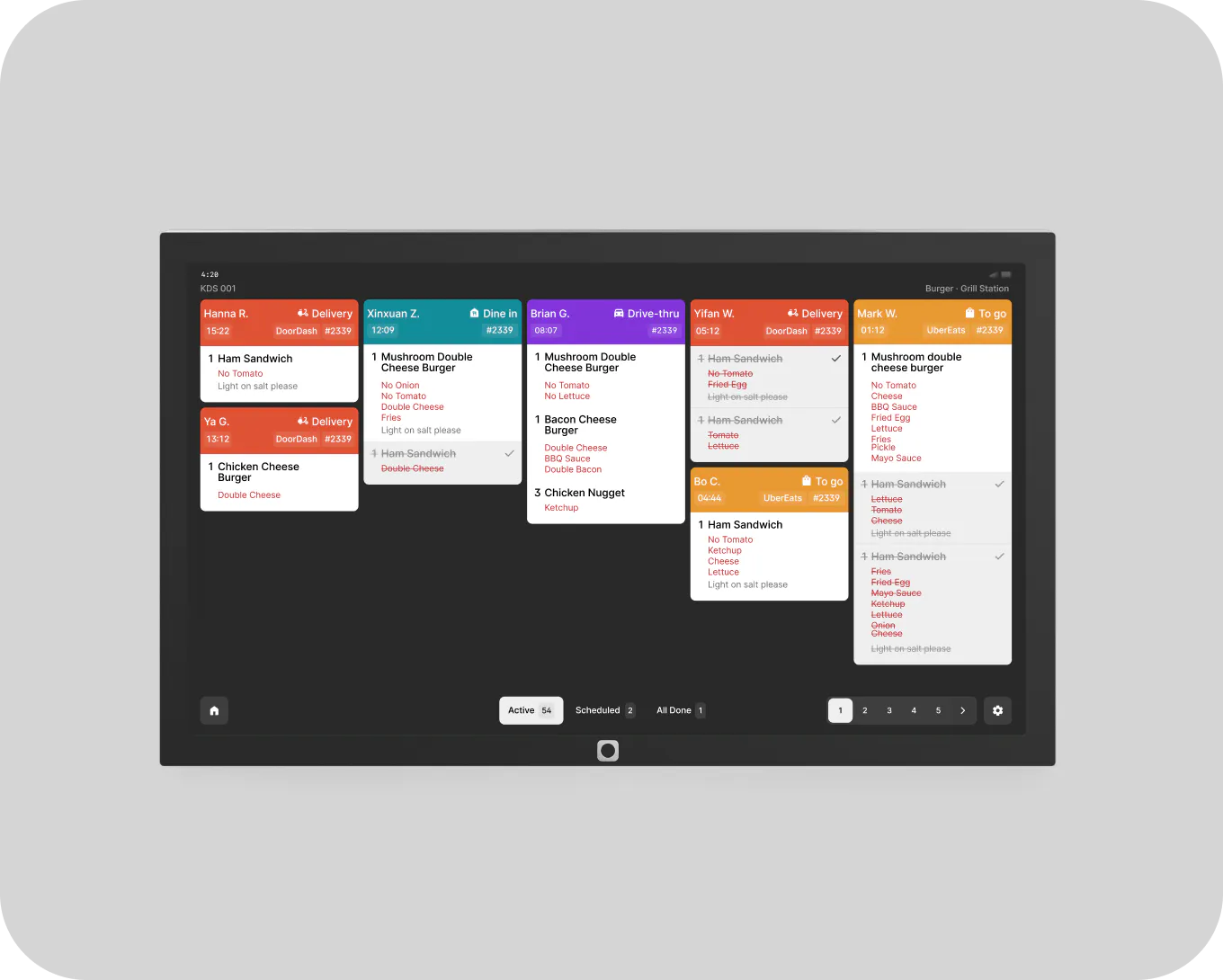
Once an order is placed on any channel, the ticket needs to reach your kitchen. That's a separate function from payment processing. The virtual POS receives the order and sends it to a kitchen display system (KDS) or receipt printer. Your crew works the ticket. The customer never interacts with any of this.
The channels a ghost kitchen actually needs to cover
Think of each channel as its own virtual checkout environment: separate fee structures, separate payout timelines, separate dashboards, and separate customer data.
- Third-party delivery apps: Each platform has its own commission rate, its own weekly net payout schedule, and its own reporting interface. Refund clawbacks and chargebacks for delivery issues you didn't cause reduce what you receive, often without an itemized explanation, and refunds you never approved can still show up as a deduction
- Direct online ordering: Your own channel. Lower effective fees, faster deposits, and you own the customer relationship. Worth building even if third-party apps drive most of your volume today
- Phone and catering: Lower volume, but the orders tend to be larger. A browser-based virtual terminal or a payment link handles payment processing here without any hardware
The reconciliation problem shows up fast when you're running all three. Weekly net deposits don't break down to the order level. Merchant statements don't match deposits. Commission percentages drift above the contracted rate without notice. Pulling your end-of-day sales data takes an hour because the numbers live in three different places.
That's not a payment processing problem. It's a fragmentation problem. The fix is a single point of sale (POS) system that consolidates all of it, and ideally exports cleanly to whatever accounting software you already use.
What you need to get started: the hardware-light setup
The good news: the physical footprint is minimal.
What you actually need:
- A tablet, laptop, or other mobile device in the kitchen with a stable internet connection
- A payment processor account for any channel you own directly (direct online ordering, phone orders)
- A KDS or receipt printer to receive and display incoming tickets
What you don't need:
- A customer-facing terminal of any kind, or a card reader at all if you take delivery orders only
- A separate device for each delivery app
- On-site payment hardware for delivery platform orders (the platforms handle that entirely)
For direct online ordering, connect a payment gateway to your ordering site. No physical terminal required. For phone and catering orders, a web browser-based virtual terminal login is all you need: open it, enter the card details, process the charge, close the tab. Most gateways also support contactless payments and mobile payments for any in-person catering pickups you handle.
Otter's Order Manager runs on the Otter Tablet accessory and serves as the central hub where delivery orders from DoorDash, Uber Eats, and your direct online ordering channel land and kitchen tickets print. No traditional POS hardware or countertop terminal required, and no separate device per delivery app.
See how Otter consolidates your delivery orders into one dashboard.


Why order fragmentation is the real virtual POS problem
A ghost kitchen running three delivery platforms is running three separate virtual checkout flows, three payout calendars, and three reporting dashboards at the same time.
In practice: your kitchen crew is watching three tablets. Your accountant is reconciling three sets of deposits. Nobody has a single accurate revenue number for yesterday until someone adds it all up by hand, usually after close, usually slowly.
Order consolidation pulls every incoming ticket into one queue regardless of which platform sent it. The kitchen works from one screen. No order gets missed because staff didn't catch a notification on a secondary tablet.
Consolidated reporting through Otter Analytics gives you one end-of-day report that covers all channels. It closes the gap between what each platform reports and what actually lands in your bank account, and it makes fee discrepancies and transaction fees visible instead of buried.
Otter consolidates orders from DoorDash, Uber Eats, and direct online ordering into a single dashboard. You see per-platform sales alongside total revenue in one view, without manual re-entry or spreadsheet workarounds. Compare that to a general-purpose virtual terminal from a processor like PayPal or Square, which was never built to solve multi-platform order consolidation at all, only to key in a card.
Running multiple concepts from one kitchen
Two to five concepts, one address, one crew, one set of equipment. Each brand has its own menu, its own platform listings, and its own revenue stream.
This setup creates a specific virtual POS challenge: without per-brand tracking, a profitable concept can quietly subsidize a money-losing one for months. You won't see it in a single aggregate daily total. You'll only see it when you finally pull the numbers apart, and by then you've already absorbed the loss.
What multi-concept order routing requires:
- Tickets labeled clearly by brand so a burger order doesn't land in a noodle bowl queue during a Friday rush
- Per-concept sales reporting so you can run a P&L for each brand independently
- Menu sync through a tool like Otter's Menus and 86ing that pushes a price change across all platform listings for a given brand in one action, not separate logins to each app for each concept
Otter supports operators running their own multiple concepts with per-concept menu management and order routing through Menus and 86ing and Order Manager, the same tools used for a single brand. If you're looking to add an entirely new online-only concept rather than manage ones you already run, Otter's separate Virtual Brands program lets you license an established online brand and fulfill its orders from your existing kitchen, a different setup from simply running your own second concept.
"Another cool thing about Otter is it helps me run multiple brands. We have obviously our main storefront Seoulmates, and then we have our virtual kitchen, which is Boffin Bird. When people order on the kiosk, they can order from both menus. Both menus are also available on all the third parties. It makes the ordering system for both restaurants, through the same system, very easy."
Christina Hong, owner of Seoulmates, Beverly Grove, Los Angeles, CA
What to look for in a virtual POS built for delivery-first operations
Not every point of sale (POS) system, or point of sale pos system as some vendors brand it, is built for a kitchen that never sees a customer. Here's what to ask before you commit.
Delivery platform integrations
The system must pull orders from all major apps automatically. Manual re-entry for any platform is a source of errors and a tax on your staff's time.
Menu management
Update prices, items, and availability across all platforms and all brands from one interface. Ask specifically: how long does a menu change take to go live on each platform? This ties directly into inventory management too, since a shared kitchen running multiple concepts needs one accurate view of stock, not a separate count per brand.
Order routing to kitchen
KDS or printer support so every ticket lands at the right station the moment the order is placed. Non-negotiable, and it's also the biggest lever you have on customer experience when the customer never sees your kitchen: a misrouted ticket is the only way most delivery-only guests ever notice something went wrong.
Reporting by channel and by brand
You need gross sales, platform fees, and net revenue broken out per platform and per concept. A single daily total tells you almost nothing useful. Your end-of-day report should show all of this in one place.
Uptime reliability and live support
A system crash during Friday dinner service is not recoverable with an email ticket. Ask vendors for uptime SLAs and confirm 24/7 phone or chat support is included.
Offline resilience
If your internet drops, can the system hold orders locally and sync back when the connection returns? For suburban ghost kitchens and shared commissary facilities, this matters.
Transparent credit card processing and data security
Locked-in processing rates with no unauthorized fee adjustments, clear PCI compliance documentation, and a straightforward answer on how card data is tokenized and protected.
Ask to see a sample merchant statement before you sign anything, and use Otter's credit card processing guide to calculate your real effective rate before you evaluate any processor's quote.
Scalability without punishing setup costs
Adding a second location or a third brand should not trigger a large per-site implementation fee.
For delivery-first kitchens, the virtual POS is the entire front of house
For ghost kitchens and virtual brands, the point of sale system is not a checkout counter. It is the complete system of record for every sale, every kitchen ticket, and every payout. There is no other front-of-house system.
A retail-oriented virtual terminal solves the wrong problem. It's designed for a business that occasionally skips a card reader. You never had one to skip.
Operators running clean books in delivery-first kitchens treat order consolidation as the primary function of their POS. They're not spending an hour at close cross-referencing three dashboards. They're looking at one end-of-day report.
Common setup mistakes to avoid:
- Choosing a system built for brick-and-mortar that treats delivery orders as an add-on
- Ignoring per-platform fee tracking until the deposits stop making sense
- Running multiple brands without per-brand reporting
- Accepting a vendor with no live support and finding that out at 7 PM on a Friday
Here's a quick self-audit: count how many tabs you open to get a complete picture of yesterday's total sales. If it's more than one, your virtual POS isn't doing its job.
See how Otter consolidates your delivery orders into one dashboard. Get started.
FAQ about virtual point of sale systems for ghost kitchens
What is a virtual point of sale for a ghost kitchen?
A virtual POS for a ghost kitchen is a software-based system that manages orders and tracks sales data without a physical checkout terminal. Because ghost kitchens have no customer-facing counter, the POS works entirely through delivery apps, direct online ordering, and kitchen-side devices like a mobile device or KDS. Its primary jobs are receiving orders, routing tickets to the kitchen, and reconciling revenue across all channels.
Do I need a card reader or payment terminal if I only take delivery orders?
No. If all your orders come through delivery apps like DoorDash or Uber Eats, those platforms handle credit or debit card processing and deposit net revenue to you on their schedule. You don't touch card data. If you also take direct online orders or phone and catering orders, a web browser-based virtual terminal lets you process those without any physical hardware.
How does a virtual POS route orders to my kitchen without a customer-facing terminal?
Orders from delivery platforms are received by the POS software and sent directly to a KDS or receipt printer. The customer never interacts with this system. Your kitchen crew works from a single queue of tickets regardless of which platform the order came from.
Can one virtual POS handle multiple concepts from one kitchen?
Yes, if it's built for that use case. A system designed for multi-brand ghost kitchens manages separate menus per concept, routes orders to the right station by brand, and reports sales separately per brand so you can track profitability per concept. Generic retail-focused virtual pos systems typically don't support this.
Why don't my delivery platform deposits match my POS sales totals?
Delivery platforms pay net of their commission and fees, and they often batch payouts weekly without breaking them down to the order level. Refund clawbacks, chargebacks, and fee adjustments can reduce what you receive without an itemized explanation. A POS that consolidates order data from all platforms helps you match gross sales to net deposits and spot discrepancies faster.
What happens to my orders if my internet goes down?
It depends on your POS. Cloud-only systems stop functioning during an outage. Some systems offer offline resilience: they hold orders locally and sync back once the connection returns. For ghost kitchens in suburban or shared-facility locations, offline capability is worth asking about before you commit.
Is a virtual POS the same as a virtual terminal?
Not exactly. A virtual terminal is one specific tool: a web browser-based form where you manually type in a customer's card details to process a payment, useful for phone or catering orders. A virtual pos system is broader. It includes order management, kitchen routing, multi-channel consolidation, and reporting, in addition to payment processing. Ghost kitchens need the full POS functionality, not just a payment entry form.
How do I update menu prices across all my delivery apps at once?
Through a POS with menu management built in. You make the change once and it syncs across all active listings. This matters most for multi-brand operators, where a manual update process means logging into each platform separately for each concept. That's a realistic source of pricing errors during a busy week.

See how Otter consolidates ghost kitchen orders