Table of contents
- How we chose these online ordering systems
- The five systems at a glance
- 1. Otter: best for managing direct and delivery-app orders together
- 2. BentoBox: best for restaurants using Clover POS
- 3. Popmenu: best for online ordering with menu and marketing tools
- 4. ChowNow: best for restaurants focused on direct ordering
- 5. Owner.com: best for a website plus repeat-order marketing
- What to compare before you choose
- Choose the system that fits your actual order flow
- Frequently asked questions about online ordering systems for restaurants
The National Restaurant Association’s Q3 2026 Consumer Insights Survey found that 50% of consumers ordered takeout or delivery during the previous week. Your ordering system needs to make those orders easy for guests to place and simple for your team to manage.
The best system depends on where orders start, which point-of-sale (POS) system you use, and what happens after a guest taps “place order.” A polished website helps, but so do accurate menus, reliable kitchen routing, a clear fee structure, and access to your customer data.
Key insights
- Otter fits restaurants that need direct orders and delivery-app orders to flow through one operation
- ChowNow and Owner.com put direct ordering at the center, with different levels of website and marketing support
- Toast Online Ordering and Square Online are natural starting points when you already use their POS systems
- Compare subscriptions, setup, payment processing, delivery, and per-order fees together; “commission-free” does not mean cost-free
How we chose these online ordering systems
These five systems cover different needs: managing several order channels, building a direct-ordering presence, improving your website and marketing, or working within Clover. We compared direct ordering, POS and kitchen fit, menu updates, customer access, fulfillment, and the fees you should confirm. Features and packages change, so request a quote for your actual location count and order volume.

The five systems at a glance
System | Best fit | Main strength | Check before you commit |
|---|---|---|---|
Otter | Restaurants managing direct and delivery-app orders | One view of orders across channels | Which products and POS integrations your package includes |
BentoBox | Restaurants using Clover POS who want a website and online ordering | Clover-connected website and ordering | Clover eligibility, package scope, and ordering fees |
Popmenu | Restaurants seeking ordering, menu, and marketing tools | Branded ordering, interactive menus, and marketing | POS connection, product bundle, and full fee model |
ChowNow | Restaurants focused on direct takeout and delivery | Branded direct ordering and customer access | Subscription, setup, payment, and delivery costs |
Owner.com | Independent restaurants seeking a website and repeat-order tools | Website, ordering, app, and marketing together | POS connection, service scope, and full fee model |
1. Otter: best for managing direct and delivery-app orders together
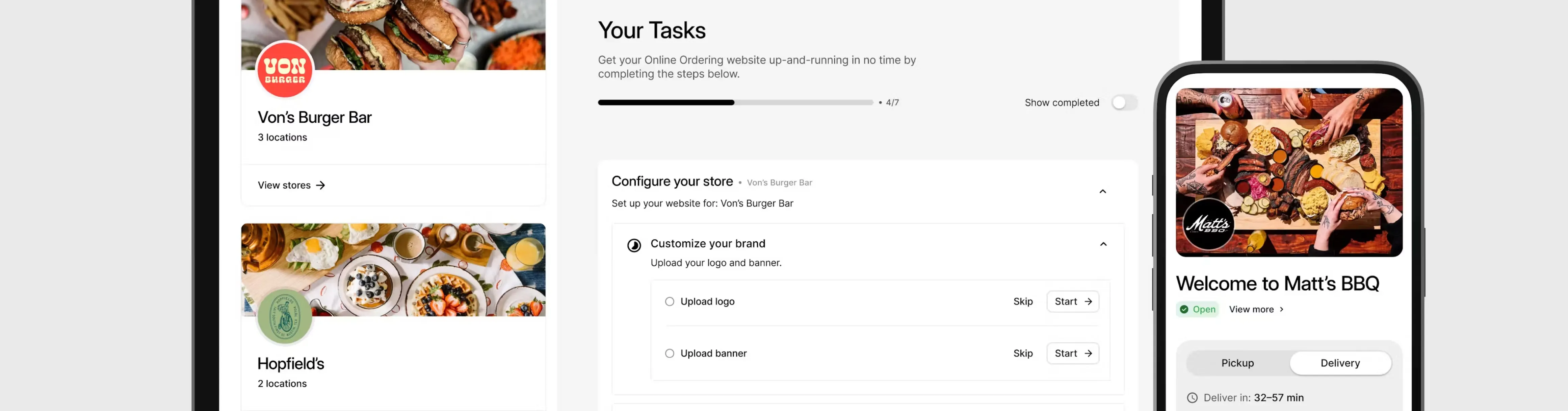
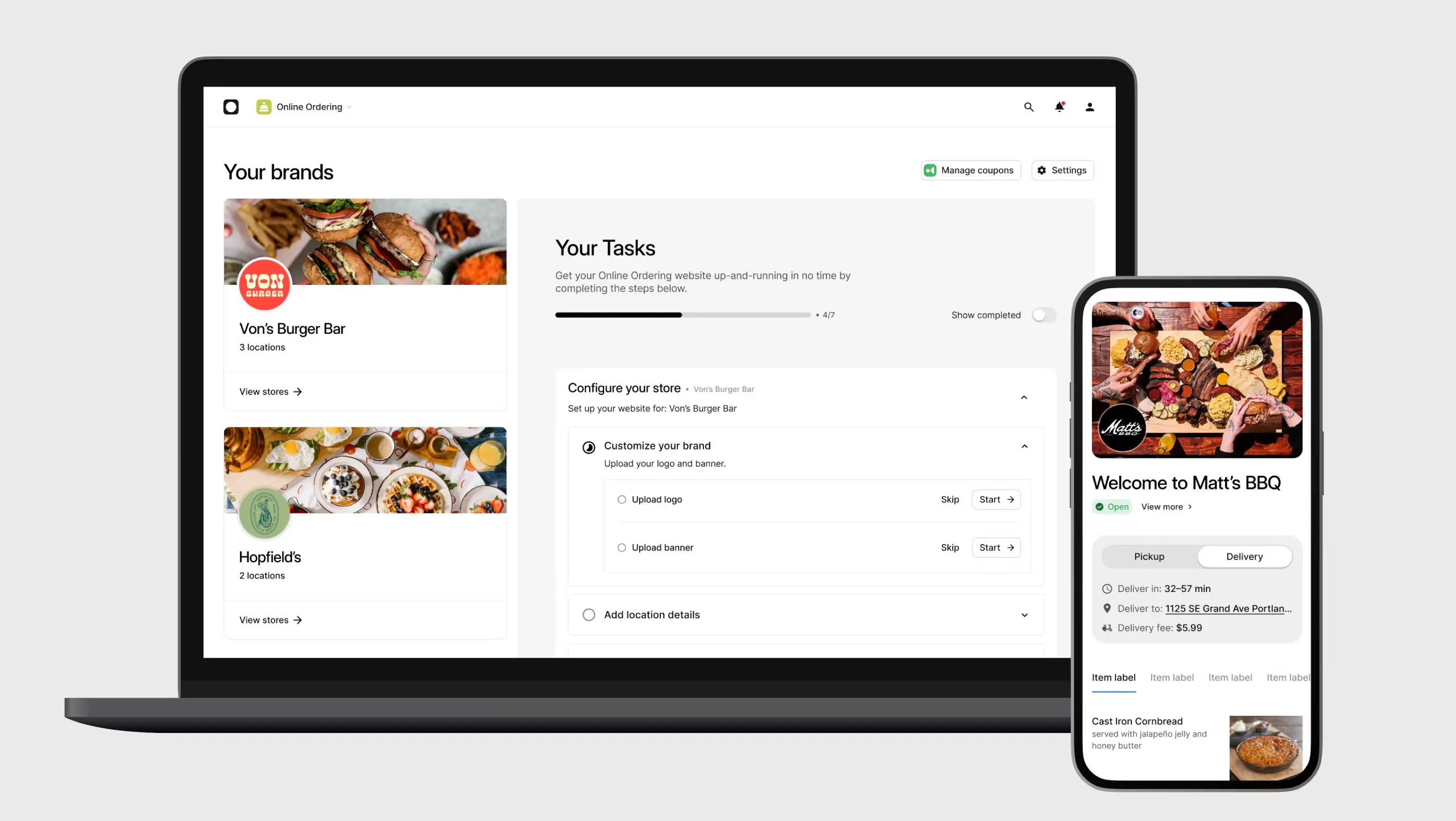
If your team takes orders through your own site and several delivery apps, the hard part is keeping tickets and menus in sync. Otter Online Ordering lets guests order directly for pickup or delivery without a marketplace commission on those direct orders. Otter can also route online orders into your POS and kitchen workflow. Order Manager brings orders from connected delivery channels into one view.
Best fit: You want to grow direct orders while keeping third-party channels open, especially across busy shifts or multiple locations. Trade-off: Check the integrations and products included in your package; a restaurant that only needs a basic ordering page may not need the wider operational setup. Direct orders can still carry payment processing or delivery costs.
“I’m saving time. I’m saving money. The employees are happier.” — Dave Goodhart, co-owner, Mustard’s Last Stand, Denver, Colorado. Dave was describing his experience managing delivery with Otter; his customer story explains the workflow.
2. BentoBox: best for restaurants using Clover POS
BentoBox offers restaurant websites and online ordering within Clover’s restaurant technology offering. Menu and order information can connect with Clover, helping your team manage an online storefront alongside your POS. BentoBox currently says its products and services are available only to Clover POS customers.
Best fit: You use Clover POS, or plan to adopt it, and want a restaurant website and online ordering connected to that setup. Trade-off: It may not be an option if you intend to keep another POS. Confirm which BentoBox tools your Clover package includes, how menu changes and tickets sync, and what you will pay for ordering and payments.
4. ChowNow: best for restaurants focused on direct ordering
ChowNow gives your guests a way to order through your own website or branded app. It emphasizes commission-free direct orders and access to customer information. This can fit a restaurant that wants more repeat business through its own channels without replacing its entire operating setup.
Best fit: You already have a POS and mainly need a direct takeout and delivery channel. Trade-off: Confirm your exact POS integration and how tickets reach your kitchen. Compare the subscription and any setup, payment processing, and delivery fees against the order volume you expect to move direct.
5. Owner.com: best for a website plus repeat-order marketing
Owner.com combines a restaurant website, online ordering, a branded mobile app, and tools aimed at bringing guests back. It makes the most sense when your current site is weak or you do not have time to run separate website, ordering, and marketing tools.
Best fit: You want one provider to manage your digital storefront and help turn first-time buyers into repeat guests. Trade-off: Ask how orders reach your existing POS and kitchen, what work is included in setup, and what happens to your website and customer data if you leave. Evaluate the full contract and fee structure, not just the monthly subscription.
What to compare before you choose
A feature list will only take you so far. Ask each provider to show what happens to one real order, from a guest’s phone through the kitchen and fulfillment. Use your menu and your current POS during the demo.
- Direct ordering and ownership: Can guests order from your site or app, and can you use their contact and order information for permitted marketing?
- Kitchen routing: Does the ticket reach your POS or kitchen display automatically, or will staff need to re-enter it?
- Menu changes: Can you update prices, modifiers, hours, and sold-out items across the channels you use?
- Total cost: Add subscription, setup, payment processing, delivery, hardware, and any per-order charges at your expected volume
- Fit as you grow: Check location controls, reporting, support hours, and how easily you can add another location or ordering channel
If you are still building the channel itself, our guide to setting up online ordering walks through the practical launch steps.
Choose the system that fits your actual order flow
Start with the friction your staff feels today. If direct orders and delivery apps arrive in separate places, prioritize channel coordination and accurate kitchen routing. If your POS already handles the work well, test its native ordering option. If your website rarely turns visitors into orders, focus on the storefront and repeat-order experience. The right choice is the one that works with your menu, your team, and your real costs.
For a closer look at direct ordering alongside your existing delivery channels, book a demo with Otter.
Frequently asked questions about online ordering systems for restaurants
What is the best online ordering system for a restaurant?
The best online ordering system depends on your POS, order volume, and the channels you want to manage. Otter fits restaurants coordinating direct and delivery-app orders; BentoBox serves Clover POS customers; ChowNow, Popmenu, and Owner.com meet different direct-ordering and website needs. Test the full order path before choosing.
Can I offer direct online ordering without leaving delivery apps?
Yes. You can take commission-free direct orders through your own ordering channel while keeping delivery marketplaces for discovery. You still need to account for payment processing, fulfillment, and any platform subscription. Make sure your team can manage both order streams without duplicate entry.
What does commission-free online ordering mean?
It means the provider does not take a marketplace-style commission on each direct order. It does not mean that every order is free to process or deliver. Ask for a breakdown of payment, subscription, setup, delivery, and any per-order charges.
Do I need to change my POS to add online ordering?
Not always. Some ordering providers connect to an existing POS, while a POS provider may offer its own online ordering tools. Ask for a live demonstration using your POS version, menu modifiers, and kitchen setup. Confirm what happens when an item sells out or an order needs a refund.

Explore online ordering with Otter