Table of contents
- What makes bakery POS software different from standard restaurant or retail POS
- The must-have features every bakery POS should cover
- How your POS should reflect your bake schedule
- Managing in-store, online, and delivery orders without the chaos
- What bakery POS software actually costs: understanding total cost of ownership
- The best bakery POS software options
- Time your switch strategically
- Your POS format decides how well your bakery runs, every single service
- Frequently asked questions about bakery POS software
Running a bakery means you are doing three jobs at once: fast counter checkout, custom cake order management, and production planning, all before 10 a.m. The problem is that most POS systems were built for one of those jobs, not all three. Fast payment processing is table stakes, but for bakery operators that is just the starting point. You also need modifiers, kitchen routing, pre-order capture, and sales data that tells you what to bake tomorrow.
Here is what separates a true bakery POS system from a generic checkout app: which features actually matter, what the full cost of bakery management software looks like, and how to switch without shutting down your operation.
Key insights
- Bakeries are production businesses first: the most valuable data in your POS is not your inventory count, it is your time-of-day sales breakdown, which tells you what to bake tomorrow and in what quantity.
- Retail POS systems were never designed for custom-order modifiers, kitchen ticket routing, or multi-channel order management, the three workflows that break down first during a real bakery rush.
- The hardware sticker price tells you almost nothing about what a bakery POS actually costs. Monthly software fees, per-transaction rates, and add-on modules for loyalty programs and online ordering can more than double your total annual spend.
- Multi-channel order chaos, walk-in, online, and delivery orders landing simultaneously with no unified view, is the single most common operational failure point for growing independent bakeries, and the fix is one platform, not more screens.
What makes bakery POS software different from standard restaurant or retail POS
Bakeries sit at the intersection of retail and restaurant, and that is exactly where generic systems fall apart.
A retail POS handles scan-and-pay: a cashier runs a barcode scanner over an item, opens the cash drawer, and takes payment. That covers a gift shop, not a counter where someone orders a latte, a croissant, and a custom birthday cake with three flavor options and a pickup date four days out. A restaurant POS adds kitchen ticket routing, daypart reporting, item modifiers, and multi-channel order management, the workflows a bakery actually needs.
Even standard restaurant POS software has gaps. Systems built for QSR burger flows often lack deposit workflows for custom orders, weight-based pricing for bread sold by the pound, and the free-text note field that prints clearly on kitchen tickets. That last one is the most common complaint from bakery operators who have tried adapting a generic system: the custom cake notes get lost between the counter and the kitchen.
The right bakery point of sale system covers all of it: counter-speed checkout, unlimited item modifiers for flavors, fillings, sizes, and decorations, kitchen ticket routing, and unified order management across every channel. Whether you run a single-location independent shop, a fast-casual bakery cafe, a ghost-kitchen brand, or a multi-location operation, the underlying need is the same: restaurant-native logic, not adapted retail software.
The must-have features every bakery POS should cover
Before you evaluate any specific system, build your requirements list around these core capabilities.
Fast payment processing
Cash, card, and contactless: every terminal should support tap-to-pay at minimum and accept the payment methods your guests actually use. If you handle catering or wholesale orders, confirm split payment support before signing anything.
Item modifiers and custom orders
This is where most bakery operators get burned by generic systems. You need unlimited modifier groups (flavors, fillings, sizes, decorations) plus a free-text notes field that prints clearly on kitchen tickets. If the notes get truncated or do not route to the kitchen display, staff will be shouting across the counter or passing handwritten slips. Custom orders are a core bakery workflow, not an edge case.
Menu management
Quick item creation, logical categories, and fast edits for daily sell-outs or price changes. If updating your menu takes more than two minutes, it will not get done consistently.
Customer profiles and loyalty
Repeat guests are the foundation of an independent bakery's revenue, so customer loyalty is a revenue strategy, not a nice-to-have. Your POS should capture purchase history and enroll guests at the counter or via a QR code scan, without requiring staff to manually log anything. Otter POS captures purchase history and enrolls guests through both in-store paths natively.
Offline mode
The morning rush cannot wait for your router to reboot. Confirm the system processes payments locally in offline mode and syncs automatically when connectivity returns. Test this during your trial period.
Sales reports
Daily totals, best-sellers, and time-of-day breakdowns are the baseline, and real-time reports beat waiting for month-end. The production planning angle goes deeper, covered in the next section.
Inventory, recipe costs, and integrations
Ingredient stock control still matters. Look for inventory management that supports basic inventory tracking and inventory control so you can manage inventory and flag low stock before a Saturday rush, and recipe cost tools that tell you the true margin on each item. Just as important is how the POS connects to the rest of your stack: open integrations let you sync employee management and scheduling tools, and export clean sales data to accounting software like QuickBooks or Xero, so bookkeeping does not become a second job.
Hardware baseline
Countertop terminal, receipt printer, customer-facing display, card reader, cash drawer, and an optional kitchen display system for routing prep tickets. A self-checkout kiosk is worth considering if your counter gets backed up during morning rushes.
Online ordering
Built in or natively integrated, not a third-party screen sitting next to your POS, so takeout and takeaway orders route straight to the kitchen.
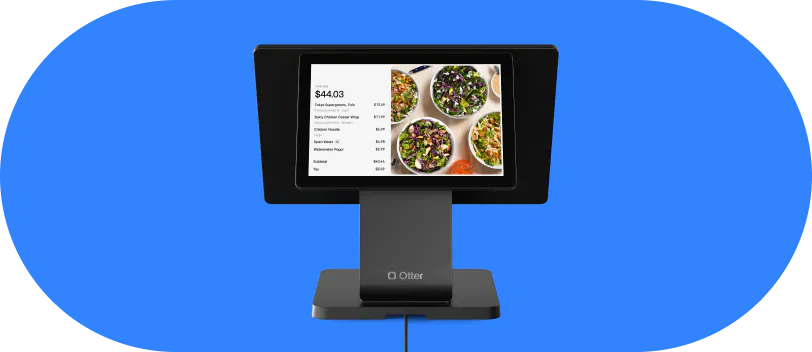
Otter brings these together on one platform built for counter-service operators like bakeries: point of sale, built-in loyalty, online ordering, a kitchen display, and an optional self-checkout kiosk.
How your POS should reflect your bake schedule
Every competitor article on bakery POS software talks about inventory tracking. That is the wrong starting question for most small bakeries. The more valuable question is when things sell, not just how many are left.
Time-of-day sales data tells you which items move in the first 90 minutes of service and which sit in the case until afternoon. That is your bake-quantity signal for tomorrow morning.
Here is a concrete example: if croissants sell out by 9:30 a.m. on Saturday but half are still in the case at 11 a.m. on Tuesday, your Tuesday bake should be smaller. Your POS gives you that data. The question is whether you are reading it, and whether your system surfaces it in a usable way.
Otter's analytics surfaces time-of-day breakdowns and best-seller data by channel and daypart, the production inputs a bakery operator actually needs, not just end-of-month accounting summaries. One bakery owner put the payoff simply:
“Using Otter has been a life-changing experience for my staff and business. The consolidation of having one tablet is a blessing, and the analytics tracking is fantastic.”
Ralph Primo Jr, co-founder of Primo's Donuts
Pre-orders and custom cakes require a different workflow
Walk-in sales and custom orders are not the same transaction type. A custom cake order needs to capture the order date, requested pickup or delivery date, deposit amount, flavor and filling modifiers, decoration notes, and any prep instructions for the kitchen. If your POS treats a custom cake the same as a counter croissant sale, staff will be filling in the gaps on sticky notes. Look for a deposit-capture workflow that ties a partial payment to a future pickup date and stores all modifier and prep details in the same order record.
End-of-day markdown logic
If your POS shows which items are still available at 2 p.m., you can trigger manual or signage-based discounts to move baked goods before close, reducing waste without guessing. This is not an advanced feature. It is just reading your own sales data.
The mindset shift that matters
Running time-of-day sales reports is production planning, not inventory management. Operators who overbake and throw money away at the end of the day are usually the same operators who are not using their POS data to inform the next morning's bake.
Managing in-store, online, and delivery orders without the chaos
“Online ordering” is a checkbox on every competitor's feature list. The real operational question is what happens when a walk-in customer, a direct pre-order, and a third-party delivery order arrive at the same time.
Without a unified system, your staff are juggling one screen per channel, missing items, and double-selling goods that sold out 20 minutes ago. This is the most common scaling failure point for growing independent bakeries, and it is entirely avoidable.
Menu sync across channels
If sourdough sells out at 10 a.m., that item needs to go unavailable everywhere simultaneously. Manual updates across three platforms during a rush will not happen. The system has to handle it automatically.
Ghost kitchen and virtual bakery brands
If you are running multiple concepts out of one kitchen, your POS needs to route orders by brand and station without creating a paper trail that confuses prep staff. Clean ticket separation is a requirement, not a workaround.
Otter's online ordering is built into the same POS platform. All channels consolidate in one view, and menu availability updates push across in-store, online, and delivery simultaneously. No extra screens, no manual sync.
A practical test for any trial
Simulate a simultaneous walk-in sale, an online pre-order, and a delivery ticket. If the interface gets cluttered, items do not sync, or the kitchen display mixes up tickets, that is a disqualifying red flag before you go live.
See how Otter handles counter orders, online pre-orders, and multi-channel order management in one bakery POS. Book a demo with Otter.
What bakery POS software actually costs: understanding total cost of ownership
Competitors anchor on a “$349 hardware bundle” or “free trial” headline. Neither number tells you what you actually pay over 12 to 24 months. Understanding the total cost of ownership, every recurring fee, processing rate, and add-on module, is the only way to compare systems honestly.
The full cost components. Ask about all of these before signing:
Cost component | What to ask |
Hardware | Upfront purchase or lease? What's the total? |
Monthly software | Per terminal or per location? What's included at each tier? |
Per-transaction rate | Card-present vs. card-not-present (online)? |
Add-on modules | Is loyalty included? Online ordering? KDS? Custom order tools? |
Contract term | Month-to-month or annual lock-in? Early cancellation fee? |
Support tier | Chat only, phone support, or dedicated account manager? |
Our guide to how much a restaurant POS system costs breaks the components down in detail.
What the real numbers look like
A mid-tier bakery POS typically runs $50 to $150 per month in software fees, plus 2 to 3% per transaction, plus hardware amortized over the contract. Add loyalty and online ordering modules and you can reach $160 to $200 per month before processing fees. That is a meaningful line item for a small bakery running on tight margins.
Watch for features that sound included but require a paid add-on at the scale you actually need. Custom order management, wholesale tools, and loyalty are commonly upcharged.
The National Restaurant Association's 2026 State of the Restaurant Industry report found that more than nine in ten operators name rising food, labor, insurance, and payment processing costs among their most significant challenges. Choosing a POS with hidden add-on fees compounds that pressure directly. Otter publishes its pricing publicly with clear plan tiers, worth benchmarking when you are building your total cost comparison.
The best bakery POS software options
This is not a ranked list with artificial scores. It is an honest match of platforms to operator types, and a starting point for the best POS for bakeries in your situation. For a wider view, see our roundup of the best restaurant POS systems.
Otter. Best for fast-casual and counter-service bakeries running online ordering, delivery, or multiple channels at once. POS, kitchen display, kiosk, loyalty, and online ordering in one platform, with transparent public pricing and no stitching together third-party integrations.
Toast. Widely adopted for bakeries with complex modifier needs and strong kitchen ticket workflows. Known for higher monthly subscription fees and mixed customer support responsiveness, a recurring complaint from operators who need fast answers during service.
Square for Restaurants. Lowest barrier to entry, affordable hardware, and solid for solo operators or very simple menus. The core Square Point of Sale app has limited multi-channel depth and modifier support for complex custom orders: it works well at small scale and shows strain as you grow.
Lightspeed Restaurant. Strong reporting and menu management, a better fit for bakery cafes with a sit-down component or multi-location groups. Steeper learning curve and higher cost than most independent operators need.
Clover. Flexible hardware ecosystem that works for counter-service bakeries. The app-marketplace model means core features may require paid add-ons, so run the full total cost of ownership math before committing.
Retail-first options like Epos Now, Shopify, and Square's standard retail plans can ring up a simple counter, but they were built for stock control and barcode scanning rather than kitchen routing and custom-order workflows, so most growing bakeries outgrow them quickly.
Time your switch strategically
Avoid the two weeks before Valentine's Day, Mother's Day, and the winter holidays. A failed migration during peak season is not a recoverable situation.
Data migration checklist
- Customer records and loyalty balances
- Full menu with modifiers and pricing
- Historical sales data for reporting continuity
- Any outstanding pre-orders or deposits
Run parallel for 1 to 3 days
Process a handful of real transactions on the new POS during a slow period before decommissioning the old system. Confirm kitchen tickets print correctly and all modifiers populate. Do not skip this step.
Staff training before go-live
Counter staff need to hit the common flows, take order, add modifier, accept payment, handle a refund, without hesitation before the first real morning rush. Run a mock service the evening before go-live.
Online channel setup
If you are adding online ordering for the first time, build and QA your digital menu, test an end-to-end order, and confirm kitchen display routing before go-live day.
Customer support quality matters more than you think
Ask your new provider whether onboarding includes a setup call, a dedicated account contact, or only documentation links. Independent bakery operators typically do not have an IT team to troubleshoot mid-rush. Otter provides onboarding support for new customers, a real person when something breaks, not just a knowledge base link.
Your POS format decides how well your bakery runs, every single service
The morning counter rush, simultaneous multi-channel orders, and custom-cake modifier complexity are restaurant-operations problems. Retail POS was never designed to solve them.
The bakeries running the tightest operations share one habit: they use their POS data, time-of-day sales, modifier usage, channel volume, as input for production decisions, not just end-of-month accounting. They know what sold in the first 90 minutes on Saturday. They know which modifiers get ordered most on custom cakes. They use that data to bake the right amount of the right things.
Your point of sale is not a cash register. It is the operating system for your production cycle, your kitchen, your customer relationships, and your cost structure. Choosing based on hardware sticker price or a free trial ignores the part of the decision that actually determines whether your busiest mornings run smoothly.
Ready to run your bakery on a POS built for restaurant-speed operations? Book a demo with Otter.
Frequently asked questions about bakery POS software
Do I need a separate system for online ordering, or can my bakery POS handle it?
The best bakery POS systems include online ordering natively, so orders route directly to your kitchen display or receipt printer without a separate screen. Otter includes online ordering built into the same POS, keeping your menu availability in sync across all channels automatically.
Can a bakery POS sell items by weight?
Some POS systems support weight-based pricing, which is useful if you sell bread or pastries by the pound. This feature is not universal, so confirm it during your trial, and verify whether you need a compatible scale and how that integration works before you buy hardware.
What happens if my internet goes down during the morning rush?
Most modern cloud-based POS systems include an offline mode that lets you process card and cash payments locally. Offline transactions queue on the device and sync automatically when the connection restores. Always confirm offline mode is included in your plan tier and test it during your trial period.
How do I handle custom cake orders in a POS system?
You need a POS with robust item modifier groups (size, flavor, filling, decorations) plus a free-text notes field that prints on kitchen tickets. For multi-day custom orders, look for a deposit-capture workflow that ties a partial payment to a future pickup or delivery date. If your POS cannot capture the prep notes and the deposit in the same order record, staff will be filling in the gaps manually.
How much does bakery POS software cost per month?
Expect to pay $50 to $150 per month in software subscription fees for a mid-tier system, plus per-transaction processing fees (typically 2 to 3% for card payments), plus hardware amortized upfront. Adding modules like loyalty, online ordering, or a kitchen display can push monthly software costs to $160 to $200 or higher before processing fees. Always request a full breakdown before signing anything.
Can I run a loyalty program through my bakery POS?
Yes, most modern POS systems offer loyalty programs. Look for one that lets guests enroll at the counter via the POS terminal or by scanning a QR code, and that awards points automatically with each purchase to build customer loyalty. Otter includes both in-store enrollment paths as part of its loyalty feature.
What is the difference between a bakery POS and a general retail POS?
A retail POS is built for straightforward product sales: scan a barcode with a barcode scanner, take a payment, done. A restaurant-native bakery POS adds kitchen ticket routing, order modifiers for custom items, daypart sales reports, and multi-channel order management. For any bakery with a cafe component, online ordering, or custom-order business, a restaurant-native POS is the more capable choice.
How long does it take to set up a new bakery POS?
A basic counter-service setup, hardware, menu, and payment processing, can go live in a single day for a simple operation. More complex configurations including online ordering, loyalty, and kitchen display routing typically take 2 to 5 days when you include staff training and a parallel-systems period. Choose a provider that offers a real onboarding call, not just a documentation link.

See Otter's bakery POS in action